Virtual Glasses Try On: How WebAR Simplifies Online Eyewear Shopping (No Coding Needed)
Online eyewear shopping sounds convenient—until you actually try to choose a pair.
Will the frame sit too wide? Too narrow? Too bold?
Most shoppers end up opening five tabs, zooming into product photos, reading reviews, and still hesitating. That hesitation is exactly where conversions drop.
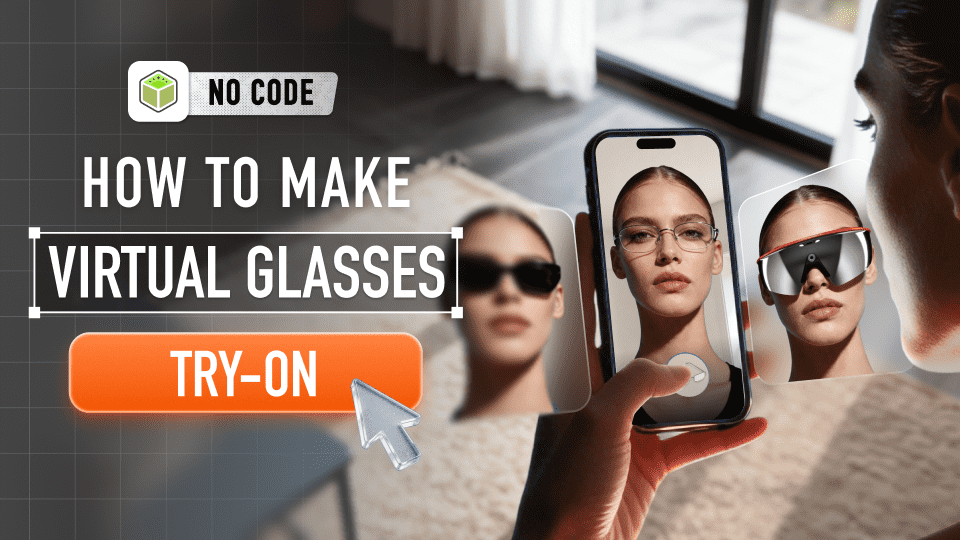
A well-built virtual glasses try on experience removes that uncertainty. But here's the key difference: when it runs through WebAR instead of an app, customers don't need to download anything. They tap once, allow camera access, and see the frames on their face immediately. That simplicity changes everything — for both shoppers and brands.
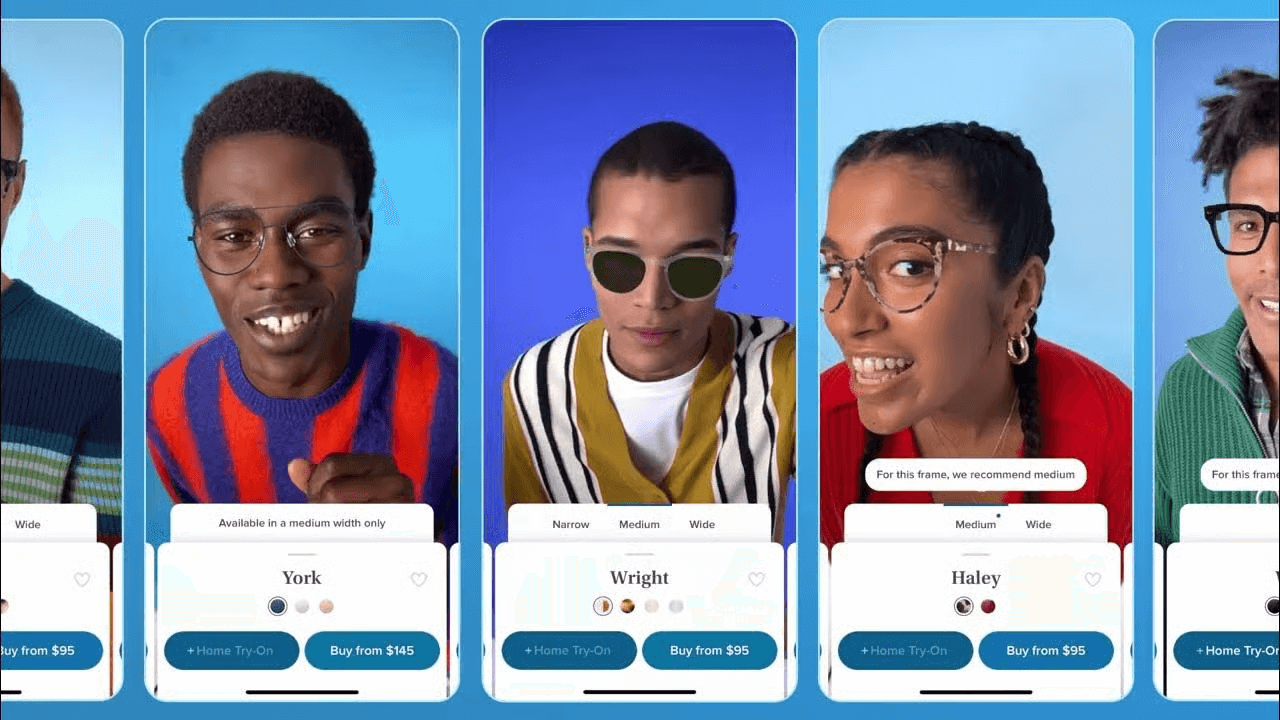
The Hidden Pain Points of Traditional Online Eyewear Shopping (And How WebAR Fixes Them)
Most eyewear brands treat virtual glasses try on as an optional extra, but it directly shapes customer trust and business efficiency. Shoppers don't just want to view glasses online—they want to know within seconds whether a frame fits and suits them. For retailers, the goal isn't a fancy feature; it's a solution that lowers costs and builds long‑term loyalty. Two major pain points hold back online eyewear sales, and WebAR-powered virtual glasses try on solves them better than any app-based tool:
Sky-High Return Rates for Retailers
Eyewear carries some of the highest return rates in ecommerce, usually because customers cannot confirm fit and style before buying. A frame that looks perfect on a model may look completely different in real life. Returns quickly raise costs for shipping, restocking, and packaging—especially for D2C brands with tight margins.
Virtual try-on glasses online clarifies customer expectations before checkout. Retailers using browser-based solutions see fewer impulsive "just in case" purchases and significantly lower return rates. This isn’t about novelty—it's about removing doubt at the moment of decision.
Lengthy Decision Paths for Consumers
Online eyewear shoppers often spend 2–3 times longer comparing products than buyers of other accessories, jumping between pages, reviews, and images while second-guessing their choices. A smooth virtual glasses try on experience can shorten the decision funnel by up to 60%, turning casual browsers into confident buyers.
The real difference is WebAR. Unlike app-based tools that require downloads and take up storage, WebAR runs instantly in any browser on mobile, tablet, or desktop.
If you’re new to the concept, here's a detailed guide on What is WebAR and how does it work? that explains the technology behind browser-based AR experiences.
No downloads, no accounts, just one‑tap access. This frictionless experience benefits both shoppers and brands—a combination traditional app-based tools cannot match.
That's why Kivicube's web-based solution stands out for eyewear retailers, especially D2C brands without native apps. You can integrate virtual try-on glasses online into your website in minutes, with no app development or technical team required.
TTDEYE added AR try‑on and saw 3x conversions — made with Kivisense
Kivicube: The No-Code WebAR Solution for Virtual Glasses Try On (Step-by-Step Tutorial)
For brands without an internal dev team, building a quality virtual glasses try on experience can feel daunting. Kivicube solves this—it's designed for marketers and ecommerce teams, no engineering resources or technical skills needed.
For a step-by-step video walkthrough on building your own virtual glasses try-on experience from scratch, check out the YouTube tutorial below.
Watch the full tutorial to create your own glasses try-on in Kivicube
Or just keep scrolling for the simple written tutorial:
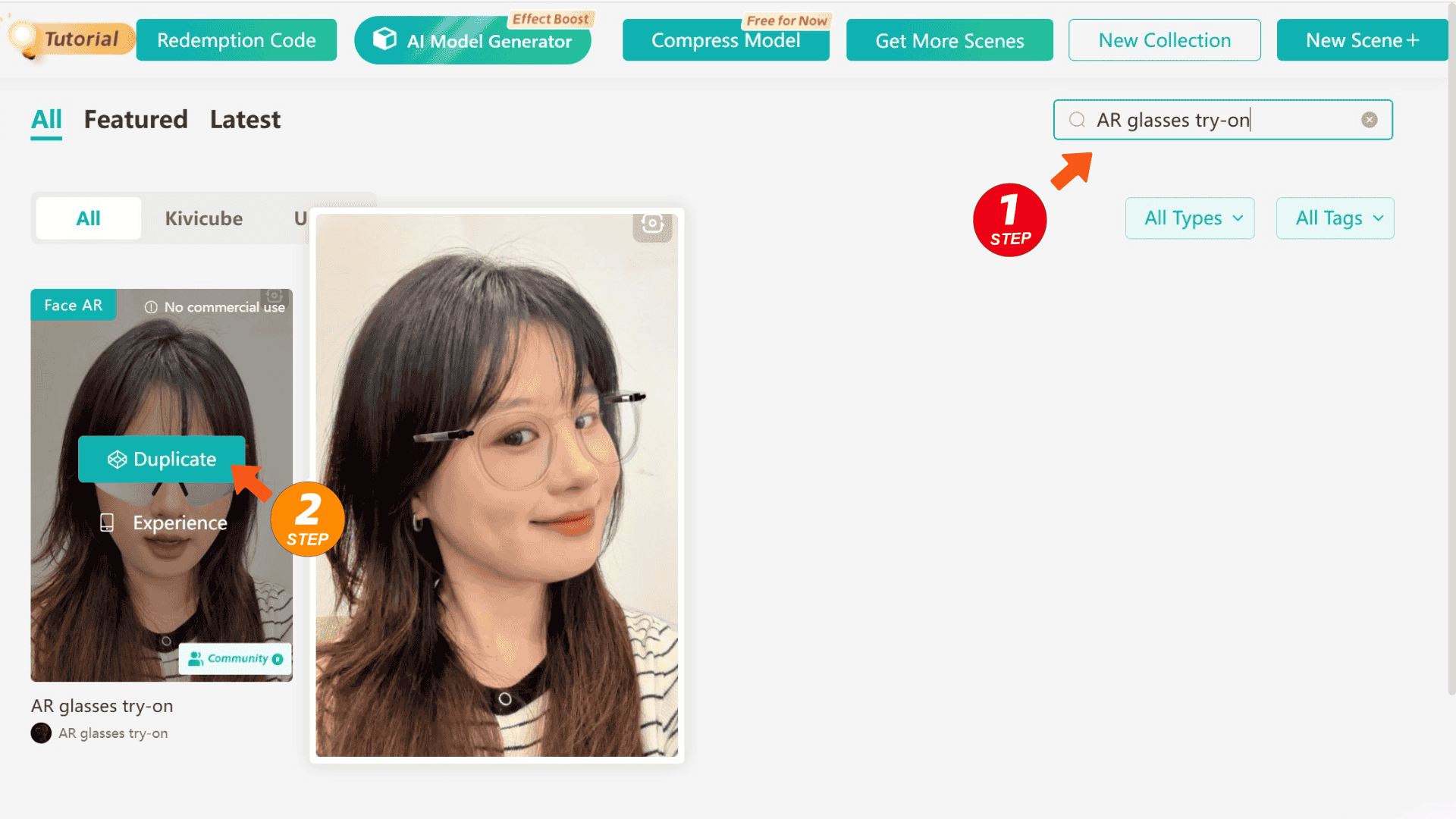
STEP 1 : Sign Up & Select the Face AR Template
Log into Kivicube and search the "Virtual Glasses Try-On" template. Click Duplicate to create your own try-on scene. The AR scene editor will open automatically — this is where you can build and adjust your AR experience visually.
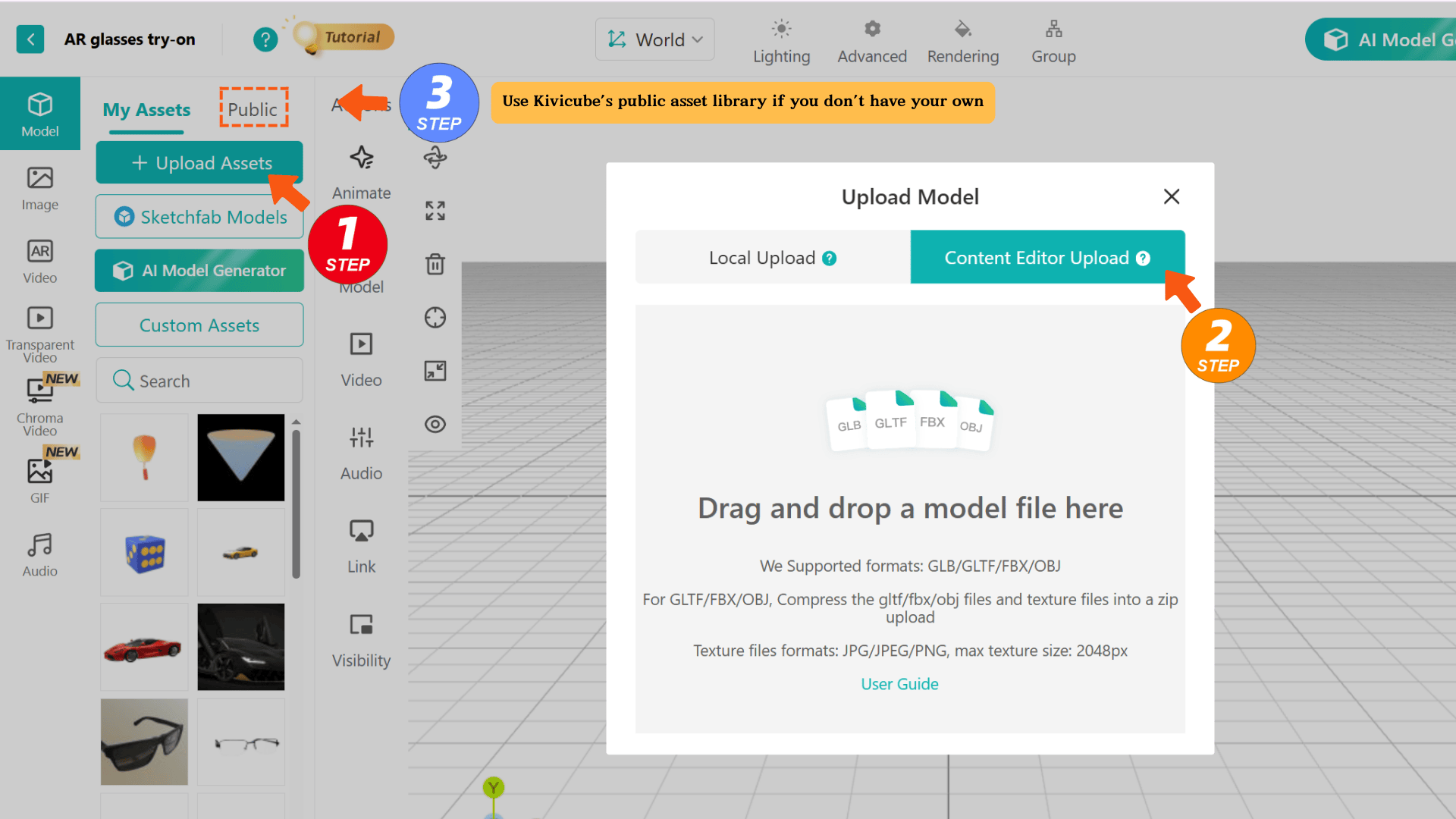
STEP 2: Upload Your Glasses Assets
Add your eyewear's 3D or 2D models (or use Kivicube's public asset library if you don't have your own). The platform supports high-precision rendering, so every detail — from frame texture and lens color to subtle shape contours — is replicated realistically, a critical factor for building customer trust.
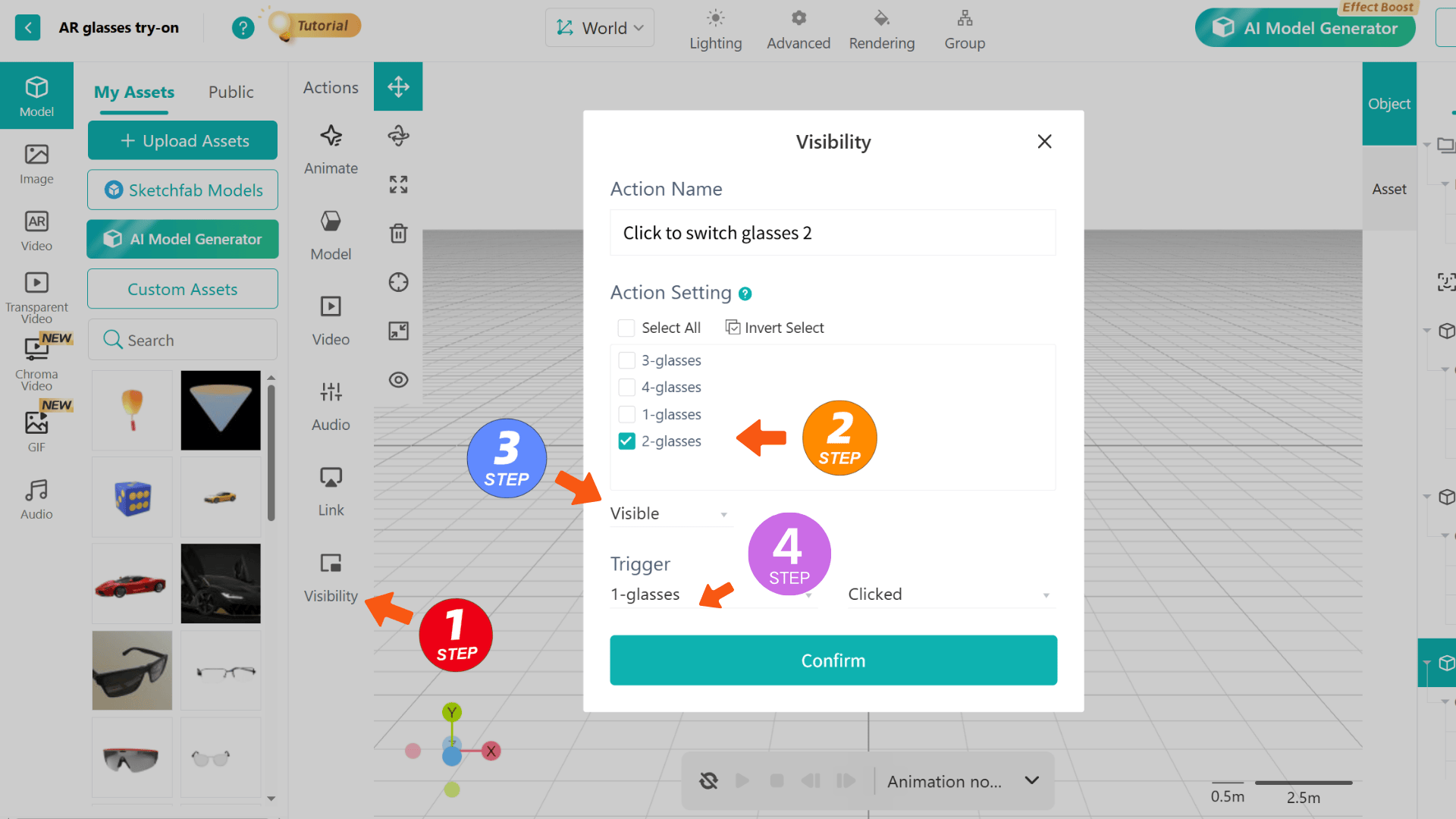
STEP 3: Customize the Try-On Experience
Fine-tune interaction settings to match your brand — let users switch between glasses styles with a tap, adjust frame position, or toggle lens tint with ease.
STEP 4: Publish & Share/Embed
Click "Publish" to generate a unique WebAR link and QR code. Embed the link directly into your PDP so shoppers can try on glasses while viewing product details, or share the link on Instagram, Facebook, or TikTok. Users can launch the experience with one tap — no downloads or sign-ups needed.
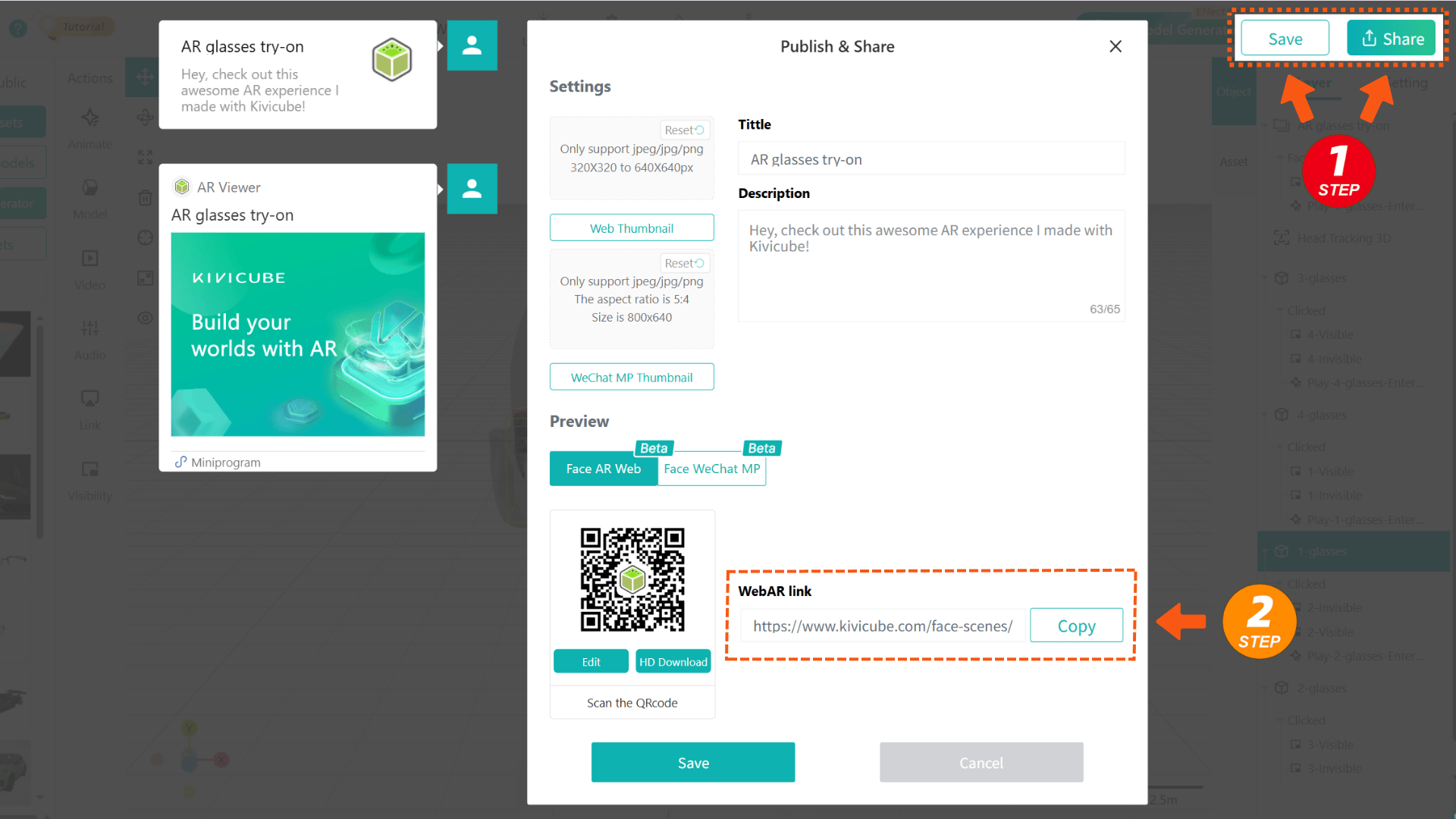
For D2C brands without apps, this web-based workflow lets you launch a premium virtual try-on tool in minutes, with no costly app development required.
That's it—your virtual glasses try on goes live in under 5 minutes. Kivicube's WebAR delivers smooth tracking, a no-code interface for easy style updates (no developers needed), and 2D/3D asset support to balance detail and cost. It's a no-fuss WebAR solution for action, not complexity.
Why Kivicube’s WebAR Stands Out From Other Virtual Glasses Try On Tools
Most virtual glasses try on tools are either overly technical (needing dev teams) or too basic (poor tracking that erodes trust). Kivicube avoids both, with core advantages tailored to eyewear brands, D2C retailers and budget-conscious vendors:
No-Code, Professional-Grade WebAR: Get studio-quality WebAR without coding. Precise face tracking fixes frame misalignment and occlusion for realistic virtual try-on glasses online, with 1:1 fitting and 2D/3D asset support for all brands, from small D2C startups to large retailers.
Seamless Integration, Zero Friction: Embed virtual glasses try on directly into your PDP (no standalone redirects), boosting conversions by 30% on average. Social sharing is easy, and D2C brands can integrate it into their website in minutes—no app or technical expertise needed.
Drives Growth & Saves Costs: Kivicube cuts returns and shortens decision paths for tangible ROI. Built-in analytics track try-on rates, top-converting styles and engagement to refine strategies. 2D asset support also slashes content creation time and costs vs. 3D assets.
D2C-First & Budget-Friendly: Our web-based platform lets small D2C brands offer premium virtual try-on glasses online with just a website, making WebAR accessible beyond large retailers with unlimited budgets.
This Dior eyewear virtual try-on experience is made possible with WebAR technology from Kivicube.
FAQ
Q: Do I need an app to offer virtual try-on?
A: No. With Kivicube, you just need a website. WebAR works in any browser— no app required.
Q: What if I don’t have 3D models of my glasses?
A: No problem. Kivicube also supports 2D assets.
Q: Can I try this before committing?
A: Yes. Kivicube offers a free tier to test the experience.
Q: How fast can I add Kivicube AR try-on to my site?
A: In just a few hours. No coding, no long development cycles. Just generate your WebAR link, embed it, and you're live.
Q: Can I access Kivicube's API for custom integration?
A: Yes! We offer full API support for custom projects. Join our Discord to get the API documentation and start building!
Q: Can Kivicube create an AR try-on experience that is the same size as real-world glasses?
A: Kivicube offers 1:1 size restoration services. Join our Discord for more information!
Final Thoughts: WebAR Virtual Glasses Try On Is No Longer Optional
As online eyewear shopping grows, consumers increasingly demand frictionless, confident buying experiences. Virtual glasses try on isn't a trend—it's a necessity, and WebAR is the gold standard for its unmatched accessibility and effectiveness.
With Kivicube, you can launch a professional virtual try-on glasses online experience in minutes. Accessible to all eyewear brands including D2C brands without apps, its 1:1 fitting, 2D/3D asset support and web-based integration deliver a seamless "try-and-buy" journey while cutting vendor costs.
No coding, no dev team—just measurable results. Skip complicated, one-size-fits-all tools. Use Kivicube's WebAR to turn virtual glasses try on into a competitive advantage for your brand and customers. Start your free trial today!