Meet Kivicube AI AR Agent: Generate Interactive AR Experiences from Prompts
Kivicube AI AR allows everyone to create new AR scenes from AI prompts, with no manual editing required. Read on to explore more!
Tired of manually modifying your current AR experience? Kivicube’s latest update introduces an AI AR Agent that helps creators transform their ideas into interactive AR experiences with simple prompts. Whether you’re a newcomer or an experienced creator, it can help you generate the AR scene within minutes.
What is Kivi AI AR Agent?
Kivicube AI AR agent is a tool that can transform your AR ideas into striking AR scene landing pages, AR experiences, and sharing pages through AI chat, easily upgrading ordinary AR scenes to complete AR projects ready for marketing, branding, and customer engagement. It can add immersive effects, such as animations and interactive games, to your AR assets, making them more engaging and eye-catching.
What Can You Do with AI-Powered AR Scene Generation
With the Kivi AI AR generator, you’ll no longer be troubled by cumbersome and endless scene adjustments. Just share your thoughts with the AI assistant, and then it will efficiently enhance the AR scenes according to your needs. What can you do with the powerful AI augmented reality generating tool? Let’s explore in detail.
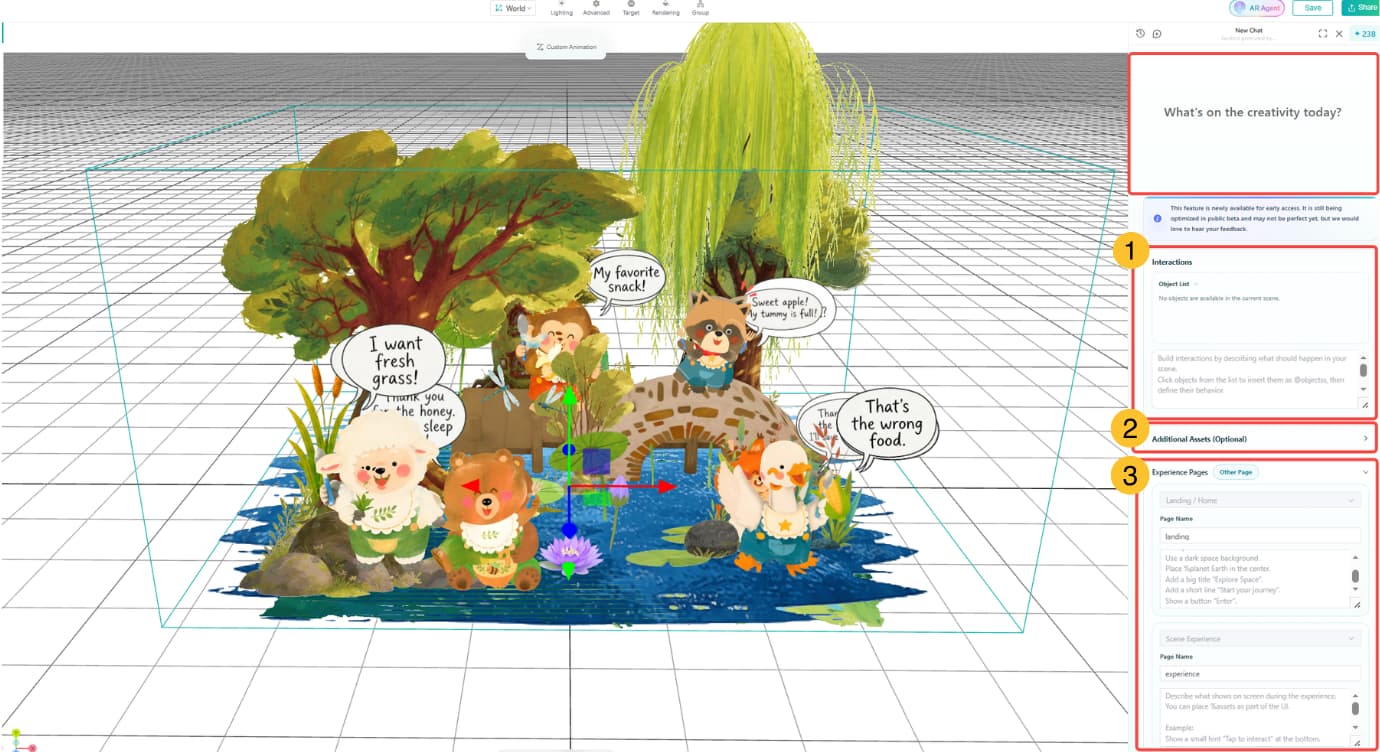
- Create a wide variety of interactions and pages from prompts.
- Generate interactive gameplay and rich animation effects, such as customizing animations for assets, adding spatial animation effects, and setting random interactive events.
- From landing pages and AR experience pages with unique atmospheres to the final sharable poster, all can be created using prompts.
How to Create an AR Scene with AI AR Agent?
Ready to make your AR experience much better? Follow these steps for AI augmented reality generation.
Step 1. Log in to Kivicube and open your AR experience, click “AR Agent” at the top right of the scene editor.
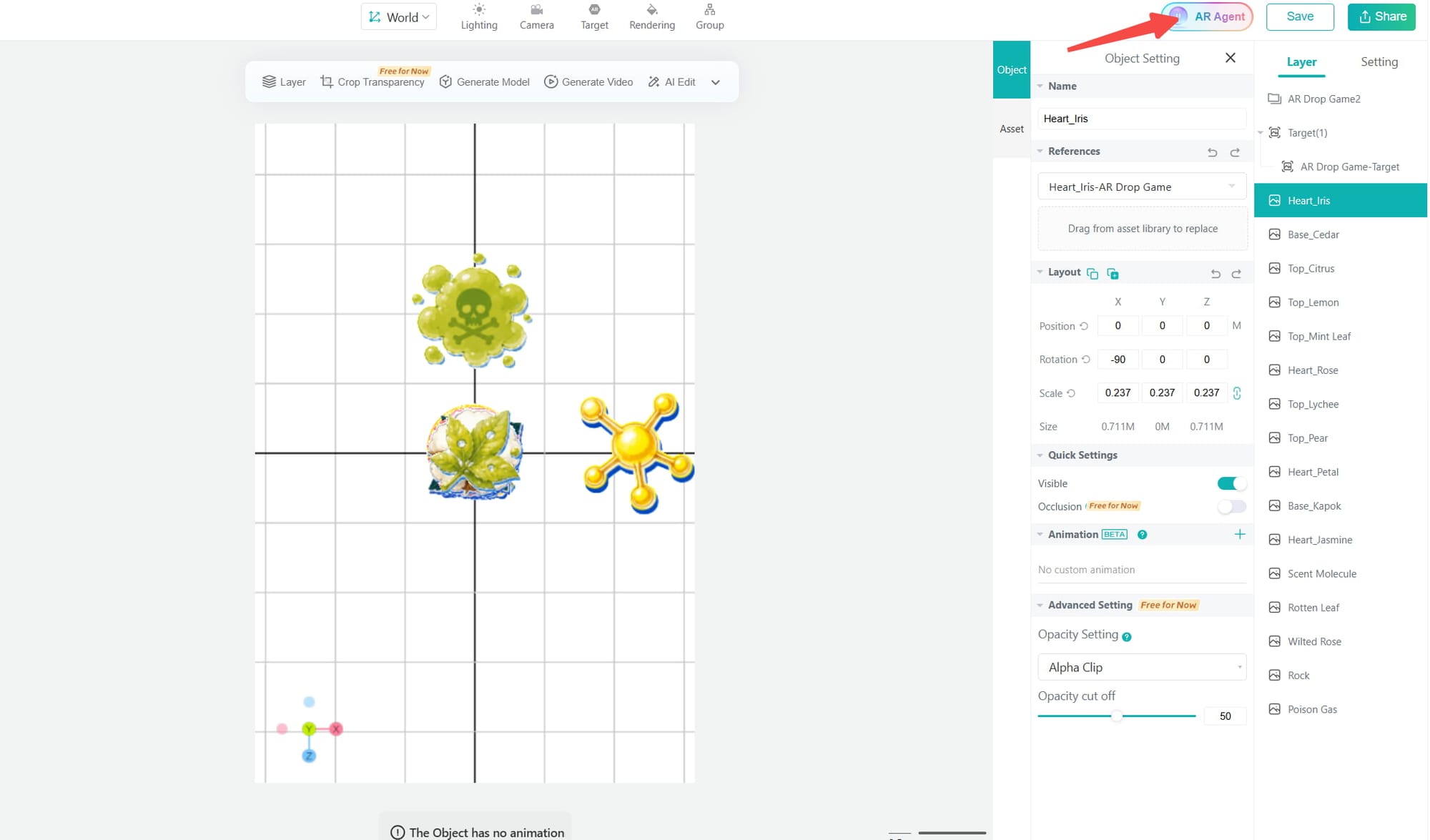
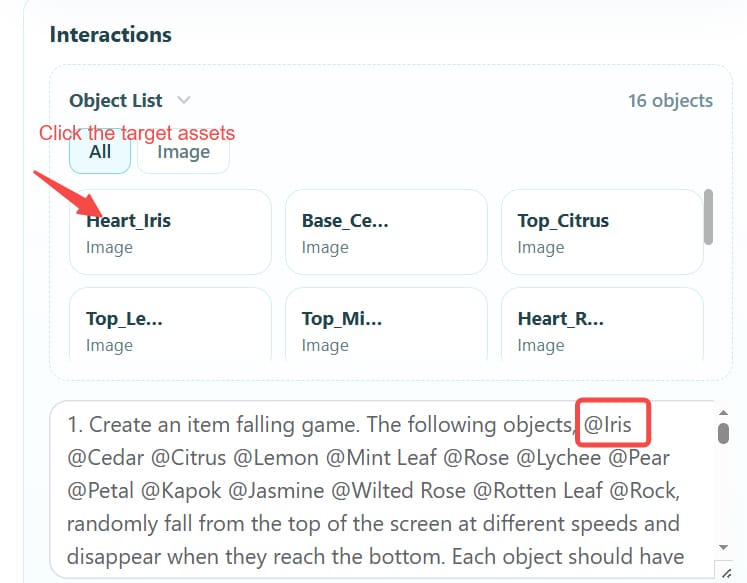
Step 2. Under the "Interactions" section, select an object and describe its behavior using AI prompts. You can define triggers, animations, timing, and other effects.
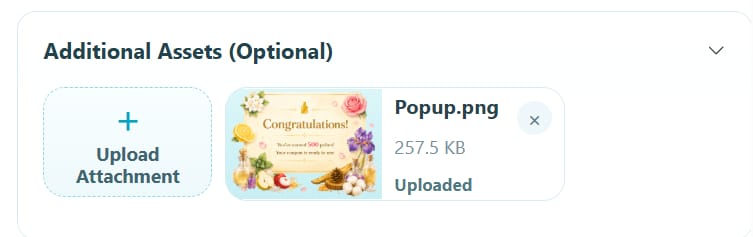
Note: You can add additional assets, such as images, 3D models, videos, and other media files, to further enrich the content of the current AR scene and serve as UI design resources for different pages.
Step 3. In the "Experience Pages" section, use the dropdown menu to select the page type and enter the corresponding commands. To add more pages, click the buttons next to the "Experience Pages" title.
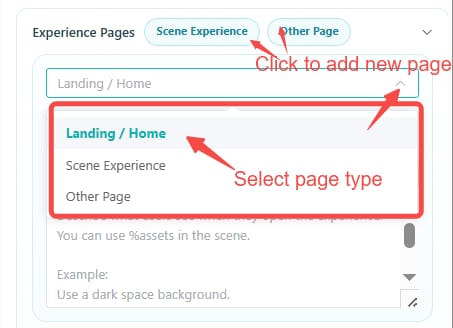
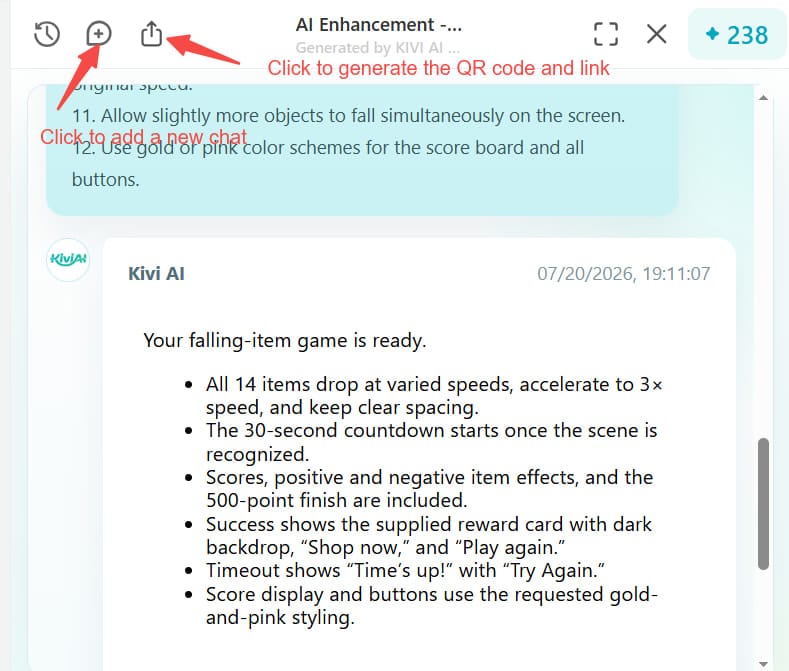
Step 4. Click "Create" to generate a new version of the AR experience with AI. If you want to try more versions, you can click the "+" icon in the top-left corner to start a new AI chat. When you’re satisfied with the creation, hit the share button to obtain the QR code and link.
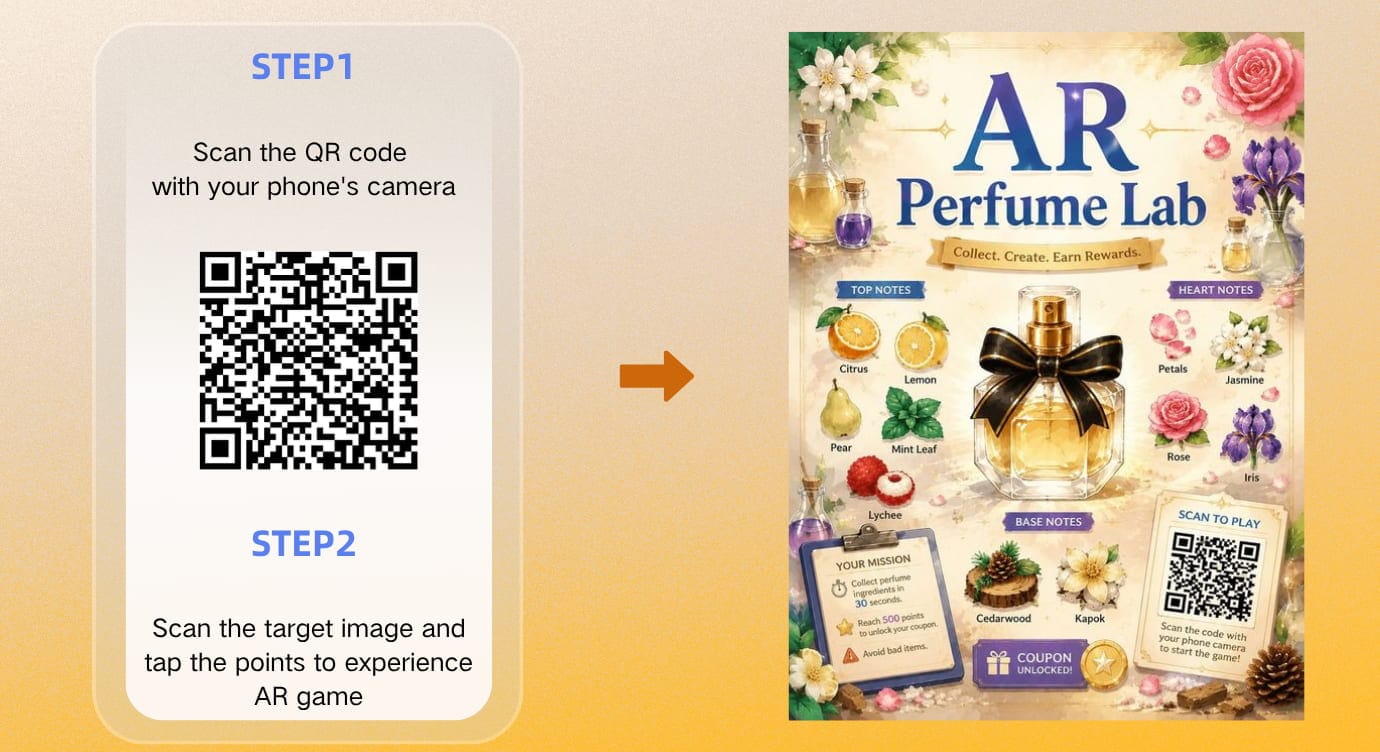
Step 5. Scan the QR code and the target image to try the AI-generated AR game.
Why Choose Kivi AI for AR Scene Creation
Aiming at making AR experience creation easier and more efficient, the Kivi AI AR generator has now been launched. Below are some advantages that prove it's worth trying.
- Free AI AR Generation
Users can explore AI augmented reality generation with 1 billion free tokens, allowing them to test different ideas before creating a final experience. No extra credits or fees required.
- Easy-to-Follow Workflow
The tool supports AI conversational generation in an intuitive interface, so users don't need to manually set up AR scenes but only add the AI commands.
- Diverse Pre-set Templates and AI Prompts
There are diverse ready-to-use templates and prompt examples to speed up users’ AR experience creation.
- Multimodal Input
Multiple kinds of files can be uploaded, such as images, videos, audio, and 3D models, enabling AI to generate AR experiences that meet specific requirements.
- One-Stop AI AR Scene Creation
The built-in Gen AI tools can generate AI images, 3D models, and videos, which can be directly used as the assets for fast AI scene generation.
- Customizable Page & Layout Setting
Users can highly customize pages and layouts using AI prompts.
- Easy to Generate Engaging AR Interactions
Built on years of experience creating digital marketing experiences, Kivicube AI AR Agent enables users to generate sophisticated AR games and interactive experiences through simple prompts. With no coding skills required.
- Advanced Deep Learning Algorithm
The deep learning algorithm helps the AI AR scene creator better understand user requirements, enabling the precise generation of their desired AR experience effects.
- Selectable AI Models
Two AI models are provided for different users: Standard and Enhanced. The standard model is suitable for basic interaction generation. For creators with high visual effects, the enhanced model can meet their needs.
Examples of AI-Generated AR Scenes
The new AI AR-generating technology redefines how you can make your new AR ideas a reality. Here are some examples of AR experiences generated by the Kivi AI AR agent.
Example 1. AI AR Headphone Poster
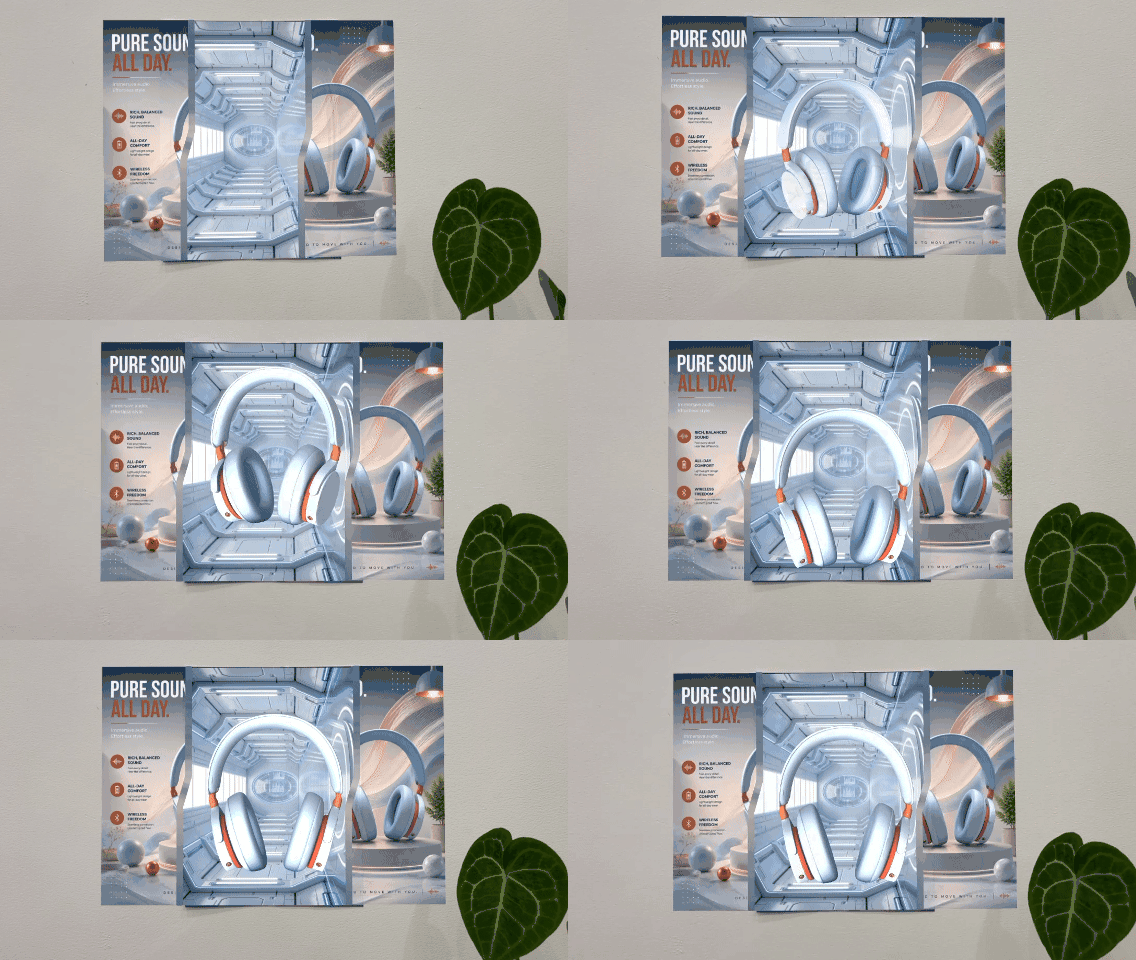
This is an AI-generated AR headphone poster. By scanning the AR code and then the poster, the AR headphone model will fly out of the poster and float above the physical poster. The AR poster also includes an interactive lucky draw feature to improve customer engagement and create a more memorable brand experience.
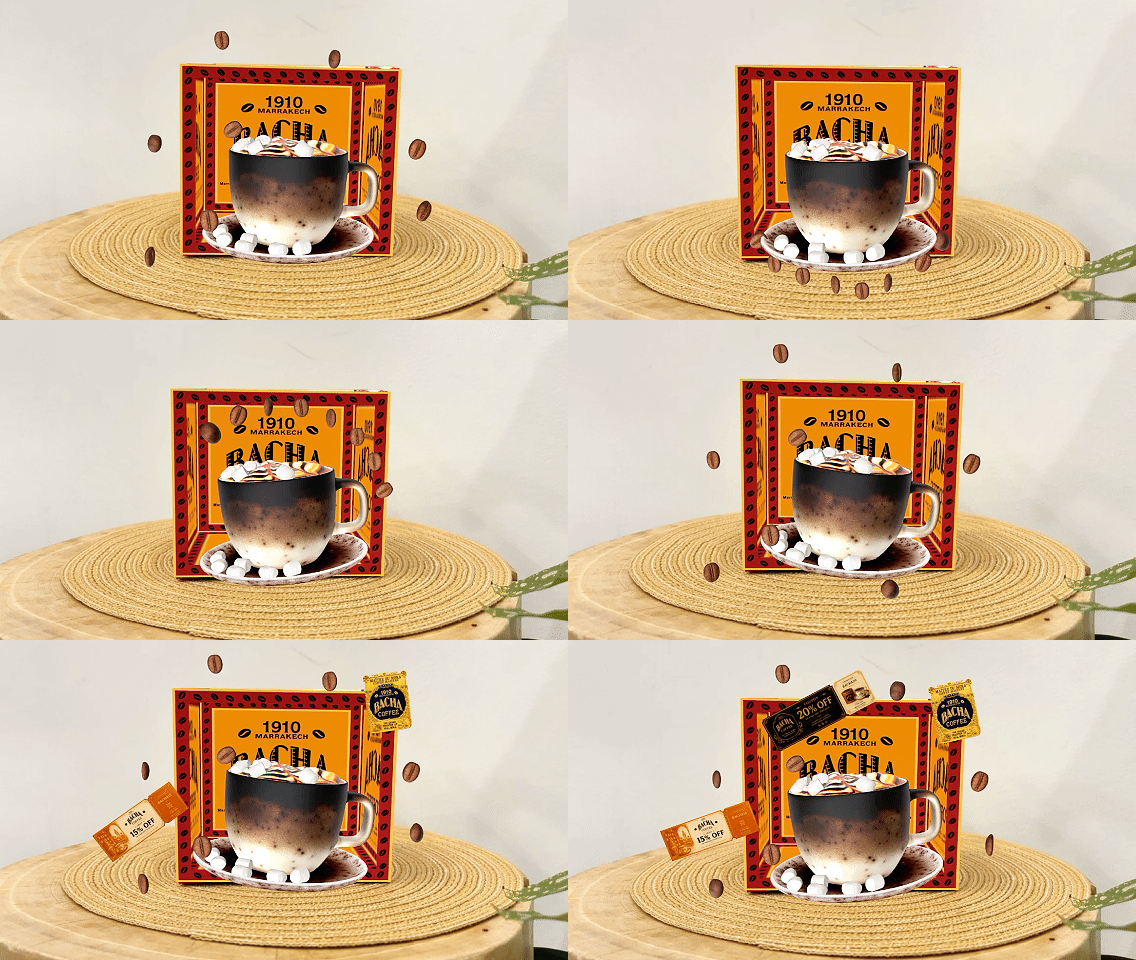
Example 2. Coffee AR Packaging
By adding plenty of realistic coffee bean animations, the AI makes the AR coffee packaging more eye-catching for consumers.
Example 3. Interactive AR Game
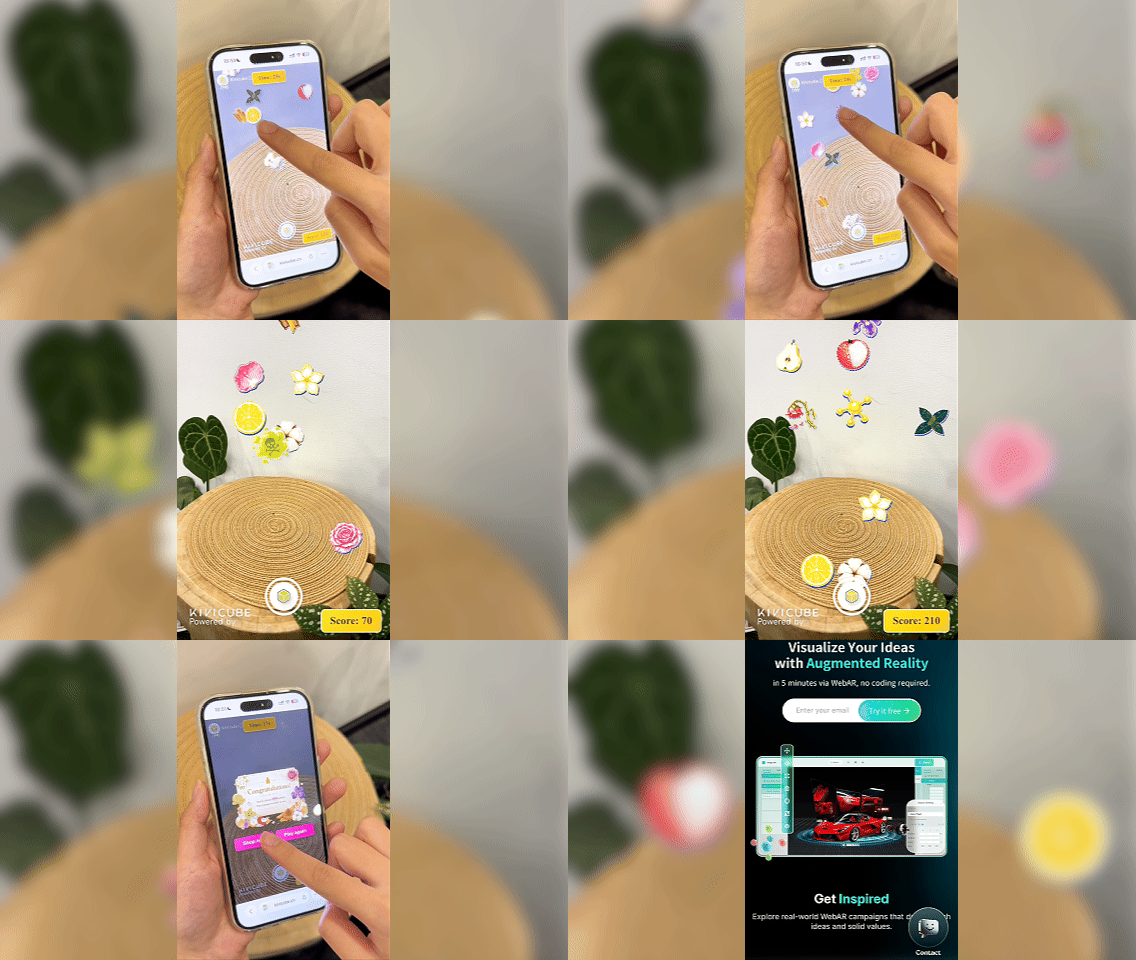
Not limited to 3D product visualization or AR campaigns, the AI AR generator also can create immersive AR games. For example, you can create a game that combines a countdown timer with real-time score tracking. Users can collect dropped items through actions such as tapping or touching and receive real-time point feedback, making the AR experience more engaging and interactive.
Kivi AI vs. Traditional AR Generators
This table compares the Kivi AI AR agent and traditional AR generators.
Kivi AI | Traditional AR Tools | |
Creation Method | AI Chat-based generation | Manual Editing with complicated coding knowledge |
Scene Customization | Natural language control | Complex timeline-based editing |
Asset Generation | Built-in AI | External tools |
Workflow | Unified platform | Fragmented process |
Learning Curve | Low | High |
Creation Speed | Fast | Slow |
Conclusion
Thanks to Kivi AI AR generator, anyone can quickly turn their AR ideas into engaging AR experiences in a short time. Whether you want to add new interactions or create a complete AR project that includes a landing page, scene experience page, and photo preview, it helps you transform ideas into professional AR experiences using simple AI prompts.
Are you ready to start your AI augmented reality generation? In this update, all mentioned functions are now accessible. Click here to explore your potential creativity and create your 1st AI AR scene free of charge.
FAQs About Kivi AI AR Scene Creation
Q: Is there another way to access the AI AR generator?
Yes. In addition to opening it in the scene editor, you can also access the AI AR generator from the main page. Go to “Features” and select “AI AR” to open the AI-powered AR creation tool, and then you can get into the AI page.
Q: What exactly can I set in the Interaction section?
You can use the AI prompts to set the effects triggered when a user clicks an object, the animation effects to be played, and the timing for the appearance or disappearance of assets, as well as add simple logic or random effects.
Q: Who Can Benefit from Kivi AI AR Agent?
• Marketing teams creating AR campaigns.
• E-commerce brands building interactive product experiences.
• Designers prototyping AR concepts.
• Educators creating immersive learning content.