English
Appearance
For the full type definitions, see Plugin API.
When written on an iframe element, property names should use lowercase kebab-case.
When written in JavaScript, they should use camelCase.
<iframe
  id="kivicubeScene"
  scene-id="7A43keFojH0v98xvFP2w52aF8Y67Zbb5"
  hide-logo
></iframe>
Boolean attributes can omit ="true".
The plugin currently accepts three formats:
hide-logohideLogodata-hide-logoThe docs still recommend standard HTML syntax, meaning kebab-case.
Important: properties are only read once when opening starts. After a scene or collection begins opening, changing attributes on the iframe has no effect. To reapply them, you must call openKivicubeScene() or openKivicubeCollection() again.
kivicubeIframePlugin.openKivicubeScene(iframe, {
  sceneId: "7A43keFojH0v98xvFP2w52aF8Y67Zbb5",
  hideLogo: true,
})
Watermark Note
If any property is set to a non-default value and the current domain is not authorized for plugin usage, a developer watermark will appear.
| Type | Constraint | Default | Example |
|---|---|---|---|
| string | 32 characters, required | none | rDM7kXvo1UJKHnQUR46s7neoCSutDul9 |
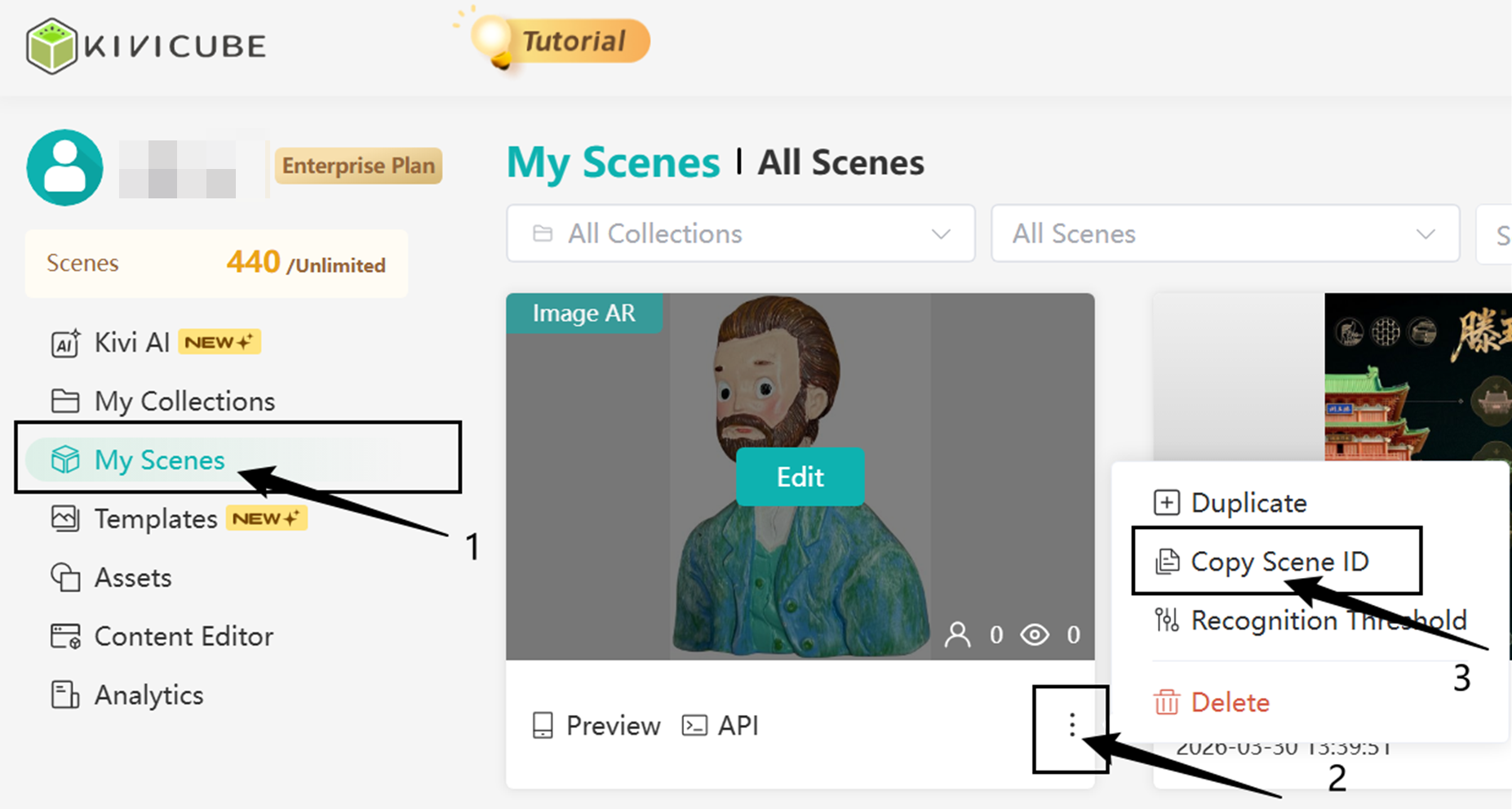
Specifies which scene to open.
How to get it:
| Type | Constraint | Default | Example |
|---|---|---|---|
| boolean | optional | false | true, false |
Whether to hide the logo on the scene landing page.
| Type | Constraint | Default | Example |
|---|---|---|---|
| boolean | optional | false | true, false |
Whether to hide the landing-page title.
| Type | Constraint | Default | Example |
|---|---|---|---|
| boolean | optional | false | true, false |
Whether to hide the asset download progress UI.
| Type | Constraint | Default | Example |
|---|---|---|---|
| string | front / back | back | front |
Specifies which camera should be preferred when the scene first opens.
| Type | Constraint | Default | Example |
|---|---|---|---|
| boolean | optional | false | true, false |
Whether to hide the default loading UI during the "load scene" stage.
| Type | Constraint | Default | Example |
|---|---|---|---|
| boolean | optional | false | true, false |
Whether to force-hide the "Start Now" button. When enabled, the scene enters directly after asset download completes.
Important
Force-hiding the button may cause audio and video autoplay to fail because of browser media restrictions. On some devices, it may also cause camera startup to fail.
If you only want to adjust the position or size of the Start Now Button, or overlay your own host-layer button, see getStartButtonRect() / setStartButtonRect() in Start Now Button. In most cases you do not need hideStart.
| Type | Constraint | Default | Example |
|---|---|---|---|
| boolean | optional | false | true, false |
Whether to hide the default scanning UI and scan guidance copy.
| Type | Constraint | Default | Example |
|---|---|---|---|
| boolean | optional | false | true、false |
Whether to hide the default record button.
| Type | Constraint | Default | Example |
|---|---|---|---|
| boolean | optional | false | true, false |
Whether to hide the default photo button.
| Type | Constraint | Default | Example |
|---|---|---|---|
| boolean | optional | false | true, false |
Whether to hide the default photo preview page.
If hideTakePhoto is true, the photo preview page is never shown. If hideTakePhoto is the default false, this controls whether the built-in photo preview page is shown.
Once hidden, you can listen for the plugin's photo event and implement your own photo preview page. That event provides the image data captured by taking a photo (clicking the default photo button). You then decide how to preview and display the image yourself.
| Type | Constraint | Default | Example |
|---|---|---|---|
| boolean | optional | false | true, false |
Whether to hide the scene background. This property is mainly meaningful for 3D scenes.
| Type | Constraint | Default | Example |
|---|---|---|---|
| boolean | optional | false | true, false |
Whether to hide the PC guide text.
| Type | Constraint | Default | Example |
|---|---|---|---|
| string | optional | '' | https://my.domain.com/scenes/id |
When the PC guide text is not hidden, use this property to configure the link URL displayed on the guide UI.
| Type | Constraint | Default | Example |
|---|---|---|---|
| boolean | optional | false | true, false |
Whether to disable "open webpage" actions triggered from inside the scene. When enabled, in-scene navigation actions do not execute, but the host layer can still listen for the openUrl event and decide whether to handle navigation itself.
Note: By default, link-opening behavior happens inside the iframe.
If the target page disables iframe embedding, opening it will fail and the UI may show a blank screen or error.
Two solutions are available:
If you have control over the target page (if not, use option 2), check for the X-Frame-Options response header. Remove it if present so the page can open inside the iframe.
If a CSP header is returned, add the frame-ancestors directive to the policy (or remove the header entirely, though this is generally not recommended) to allow the iframe to embed the page on your domain.
Example configuration: Content-Security-Policy: frame-ancestors 'self' https://your-domain.com;
Use the disableOpenUrl property to prevent opening webpages inside the iframe, and let the host layer listen for the openUrl event to handle navigation itself.
Collections support most of the same properties as scenes. The main difference is that sceneId becomes collectionId, and collections additionally support hideGyroscopePermission and hideBackToScan.
| Type | Constraint | Default | Example |
|---|---|---|---|
| string | 6 characters, required | none | b46rfc |
Specifies which collection to open.
| Type | Constraint | Default | Example |
|---|---|---|---|
| boolean | optional | false | true, false |
Supported only on collections. Hides the gyroscope permission guidance popup.
This is mainly useful when the collection does not need the gyroscope and you want to avoid requesting that permission.
| Type | Constraint | Default | Example |
|---|---|---|---|
| boolean | optional | false | true, false |
Supported only on collections. Hides the "Continue Scanning" button in the collection cloud recognition flow.
This is useful when you plan to provide your own "Continue Scanning" entry on the host layer.
| Property | Scene | Collection |
|---|---|---|
sceneId | Supported | Not supported |
collectionId | Not supported | Supported |
hideGyroscopePermission | Not supported | Supported |
hideBackToScan | Not supported | Supported |
All other properties are identical.
sceneId or collectionId, you must close first and then reopen. Do not try to swap only the src value directly.