English
Appearance
Kivicube is a platform focused on AR content creation and distribution. You can build scenes on the platform, organize them into collections, and publish them to the Web, Mini Programs, and other channels.
For developers, Kivicube provides value on two levels:
This documentation focuses on the second part: Web integration and secondary development. Here you will learn:
iframe-plugin.js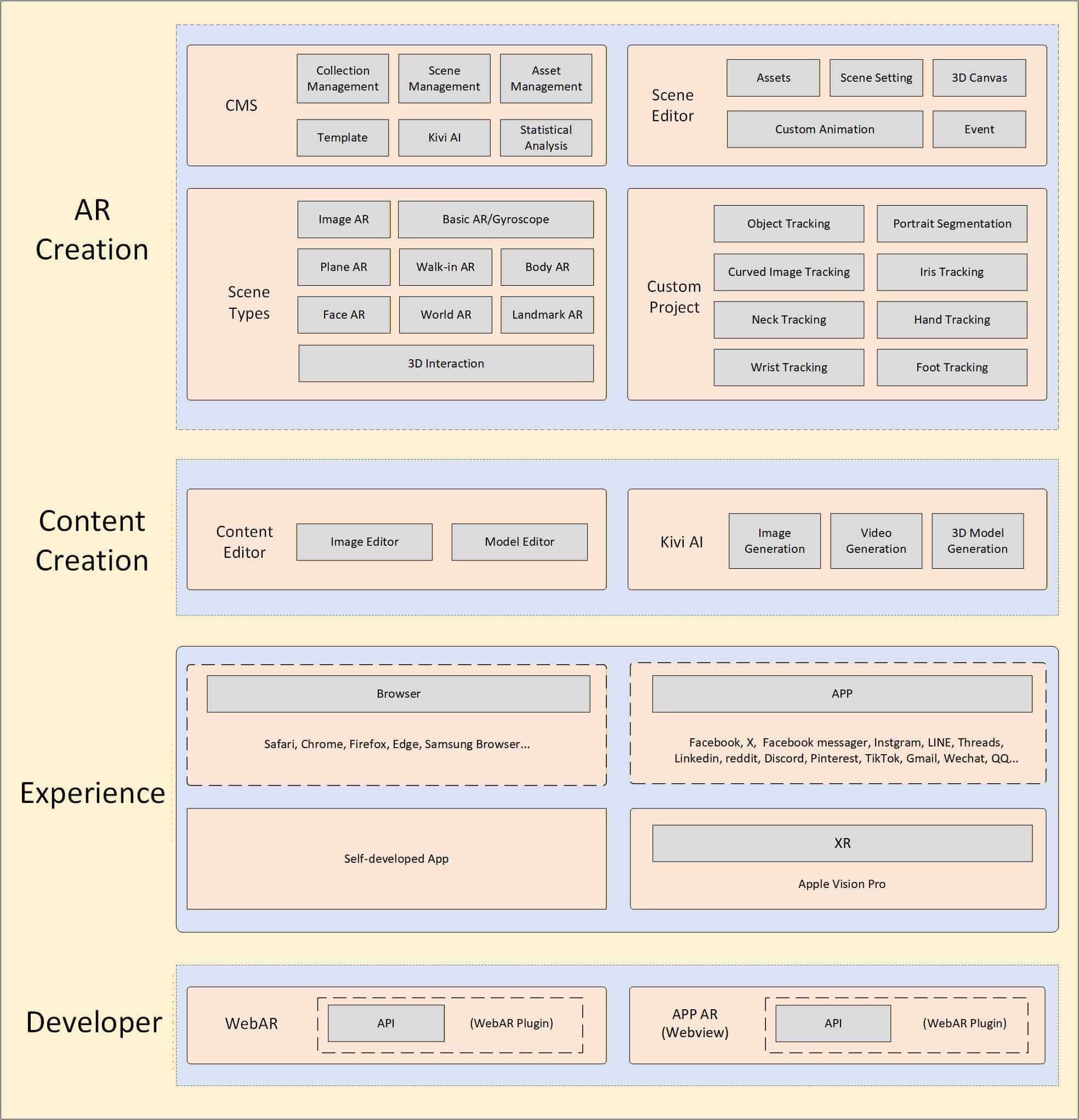
You can visit https://cloud.kivicube.com on a PC or tablet, register an account, create scenes, upload assets, configure interactions, and publish accessible scenes or collections.
For platform-side authoring instructions, see the Manual.
After publishing, the platform provides either a Web experience URL or a QR code. For integration work, the most important identifiers are:
sceneId: a 32-character scene IDcollectionId: a 6-character collection IDYou can either use the officially hosted experience page directly, or embed it into your own site.
Web scene URLs usually look like this:
https://www.kivicube.com/scenes/<sceneId>Collection URLs usually look like this:
https://www.kivicube.com/collections/<collectionId>Continue to the next page: Quick Start.