Best Adobe Aero Alternative: Create Your Own WebAR Experiences with Kivicube
If you’re seeking an Adobe Aero alternative, you’re in the right place. We’ll introduce Kivicube and show you how to create a WebAR scene with ease.
With Adobe Aero discontinued on iOS, Android, and Creative Cloud Desktop on November 6, 2025, many teams are looking for no-code alternatives to create augmented reality experiences. If you still want to turn creative ideas into interactive digital content, you may need an Adobe Aero alternative that makes it easy to create AR scenes, as well as set up animations and interactions.
This post covers how to choose the best alternative to Adobe Aero, introduces a practical option: Kivicube, and shows the detailed steps to rebuild an Adobe Aero augmented reality project without coding or downloading an app.
What Happened to Adobe Aero?
What is Adobe Aero? It was an AR creation tool developed by Adobe for designers to create and share immersive AR experiences without any coding skills. With its free resources, customizable animations, and easy sharing options, it attracted a large group of designers and creators.
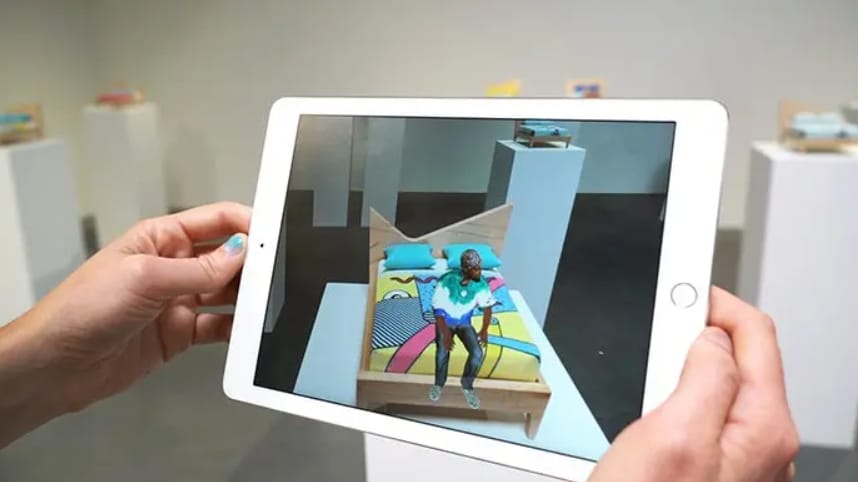
Over the years, Adobe Aero augmented reality generator helped many outstanding artists to bring their creative visions to life with eye-catching AR creations. For example, the mixed-media artist Gabe Barcia-Colombo used Adobe Aero to expand the visual experience of his artwork “Descent”, incorporating digital avatars developed from real-world scans into the experience.
However, Adobe announced that it would discontinue Aero due to changes in the AR industry and a shift in internal resource priorities. The app was removed from download platforms on November 6, 2025, and the service was officially discontinued on December 3, 2025. The discontinuation of the Adobe Aero AR tool means more than the loss of an AR creation tool. It also leaves designers, artists, and other creators looking for ways to continue their existing AR workflows.
With Adobe Aero discontinued, creators who want to continue building interactive AR experiences need an alternative that offers flexible creation tools and convenient content sharing.
How to Choose the Best Adobe Aero Alternative?
So, what’s next? Is there a practical tool that can work really well as an Adobe Aero replacement? The answer is, of course, yes.
Here are four key factors to consider when choosing an Adobe Aero alternative.
- Easy-to-Use AR Creation Tools
An AR creation platform should be easy for the user to understand and follow, so they can import assets and configure interactions for the AR scenes easily.
- Flexible Asset Import and AR Design
When picking an AR generator, it is important to see if the platform supports both 2D and 3D assets. Also, the tool enables you to import different asset types, such as images, 3D models, audio, and videos.
- AR Tracking and Interaction Capabilities
AR tracking determines how digital content appears in the real world, so look for AR creation platforms that support multiple AR tracking types, especially image tracking and world tracking.
- Convenient Publishing and Sharing
A must-try Adobe Aero alternative should make it easy to share completed AR projects. Check whether the platform supports direct links and QR codes. Browser-based publishing is another important factor. It lets viewers open AR experiences without downloading a dedicated app.
Why Kivicube Can Be the Best Adobe Aero Alternative
Kivicube is a browser-based WebAR creation platform designed to help users build interactive AR experiences without coding. Its intuitive visual editor makes it easy to bring creative ideas to life with interactive 3D models and animations.
Why Kivicube Can Be a Great Adobe Aero Alternative:
Extensive Template and Asset Library: It provides a range of ready-to-use AR assets and templates, so you can customize these resources to build your scenes without creating every asset from scratch.
Flexible AR Tracking for Real-World Experiences: With tracking methods like world tracking and image tracking, it helps users to create multiple kinds of interactive AR experiences.
AI-Powered Asset and AR Scene Generation: You can generate assets, including images, 3D models, and videos with built-in AI generators. In addition, the AI AR Agent helps users configure AR interactions through prompts.
Custom Animations and Interactive Experiences: Users can customize interactions according to their requirements and the theme of the AR scenes. The 3D animation function also lets users control how 3D characters and objects move within an AR experience.
One-Click WebAR Publishing and Sharing: Once you publish an AR scene, Kivicube automatically generates a shareable link and QR code. Visitors can open the experience directly in a compatible mobile browser without downloading a dedicated app.
Flexible API Integration: For developers building complex AR projects that require custom logic and deeper integrations, the tool provides APIs to easily integrate WebAR experiences into existing websites and mobile apps.
Adobe Aero vs. Kivicube: What's the Difference?
With Adobe Aero no longer available, creators need a new tool to bring their AR ideas to life. How does Kivicube compare with Adobe Aero in terms of key features? Let's take a closer look at the differences and see what Kivicube offers as an alternative.
Comparison | Adobe Aero | Kivicube |
Creation Method | App-based visual editor | Browser-based drag-and-drop editor |
Coding Requirement | No coding required | No coding required |
Asset Import | 2D and 3D assets | Images, videos, audio, and 3D models |
AR Tracking | Spatial and image-based AR workflows | Image, World, Face, Body, and more |
Animation & Interaction | Animation behaviors and interactive triggers | 3D animation and keyframe animation, custom events, and interactions |
AI Generation | No equivalent built-in AI AR Agent workflow | AI-powered asset generation and AI AR Agent |
Publishing | Aero sharing and export options | Web-based publishing with shareable links and QR codes |
Viewer Access | Aero-compatible viewing workflow | Browser-based access through a URL or QR code |
API Integration | No built-in API integration option | Provides APIs for integrating AR experiences into existing websites and mobile apps |
What You Can Reuse from Adobe Aero Projects
Although Adobe Aero project files (.real) cannot be imported directly into Kivicube, you can still reuse many of the original assets from your projects.
For example, you can extract and upload compatible images, videos, audio files, and 3D models to Kivicube. GLB is the recommended format for 3D models, while other supported formats include GLTF, OBJ, and FBX.
In addition, since the original scene structure, animation behaviors, and interactive triggers cannot be transferred as a complete Aero AR project, you'll need to recreate these elements in Kivicube's editor.
How to Rebuild an Adobe Aero AR Project with Kivicube
Just as you did with Adobe Aero, you can also recreate your AR projects with Kivicube. Here, we'll use an AR toucan illustration as an example to walk you through the process.
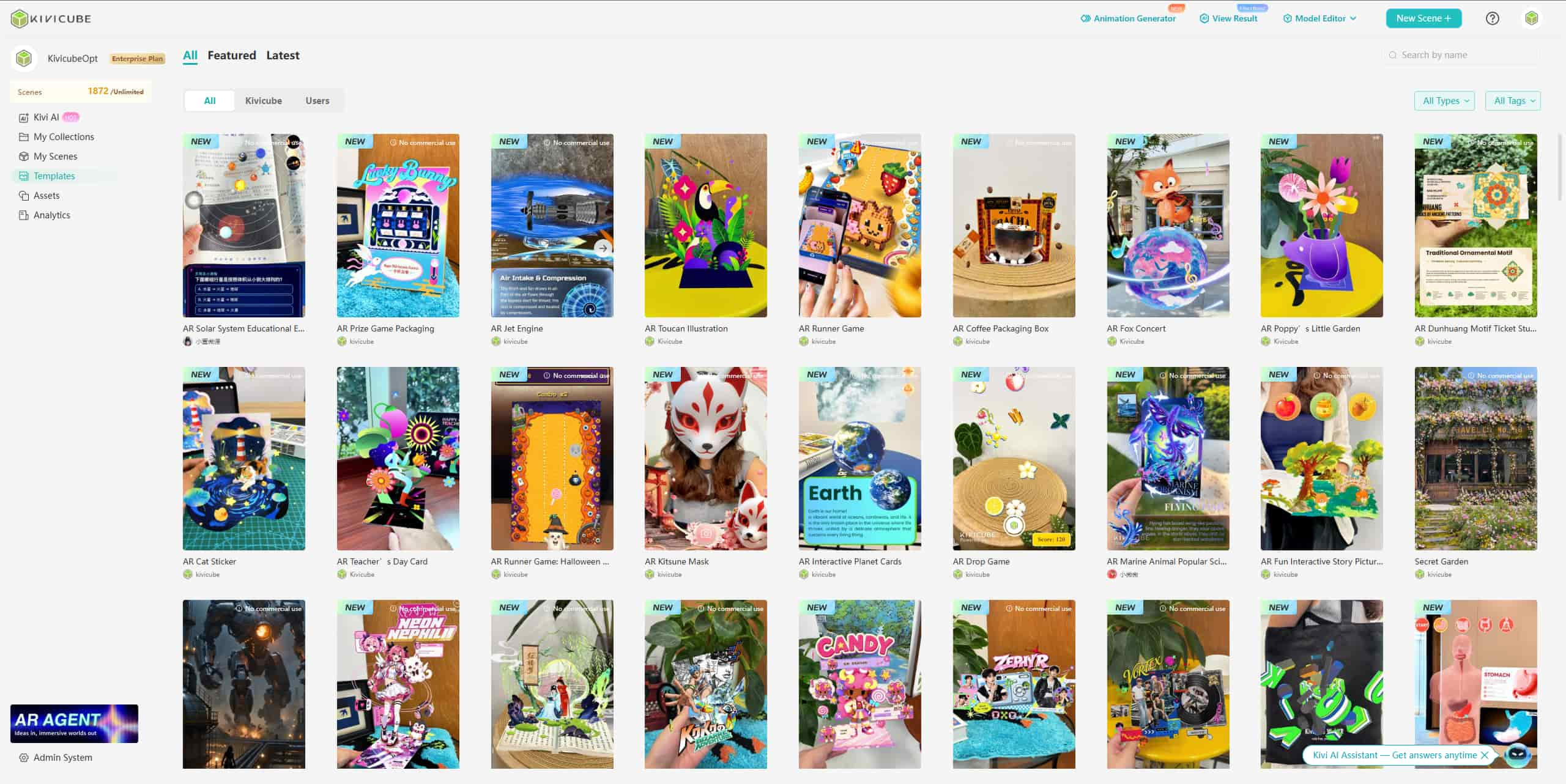
Step 1. Open Kivicube and log in. Go to the “Template” page and select a template to duplicate.
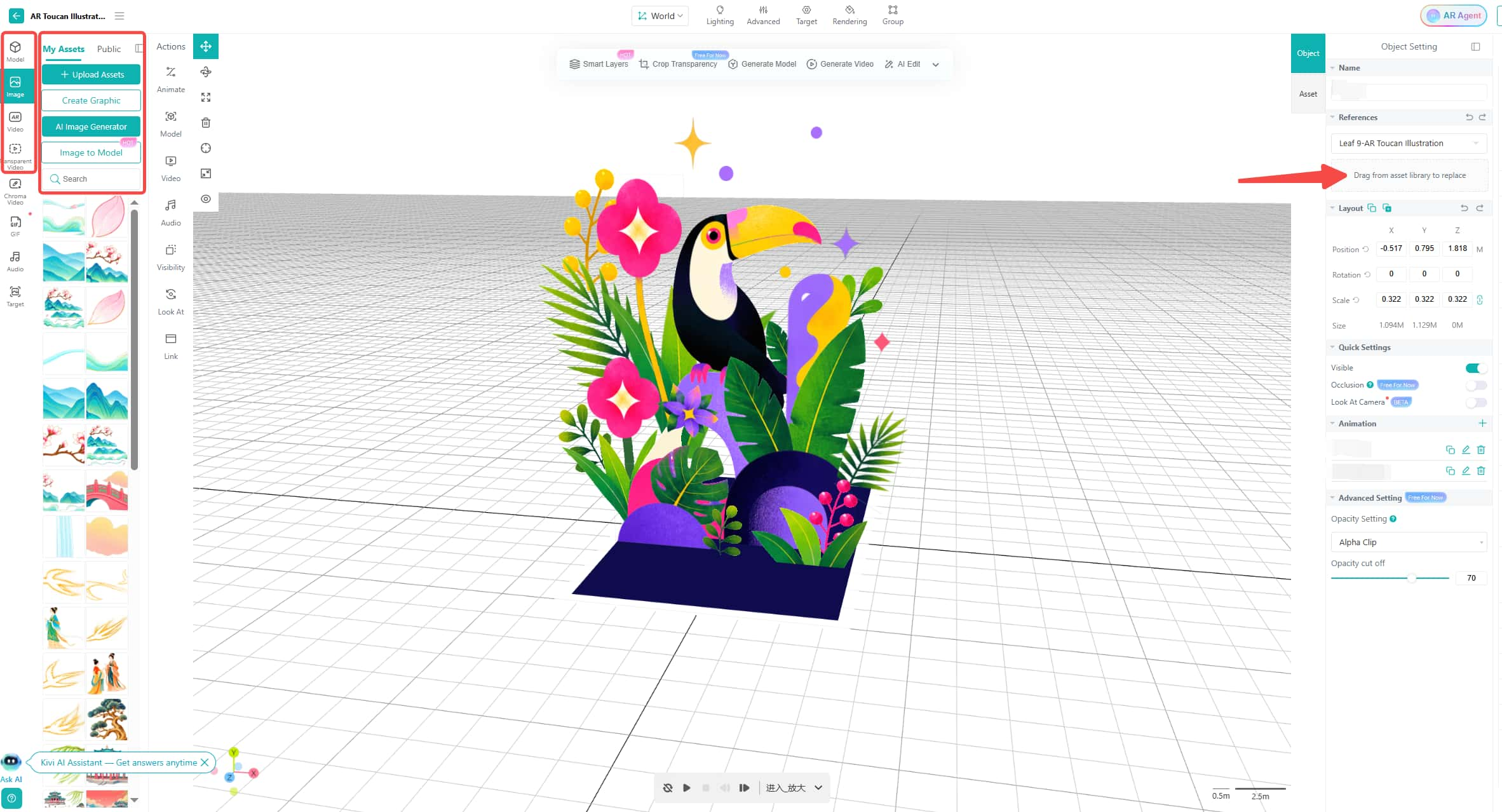
Step 2. In the editor, upload the AR assets extracted from Adobe Aero or select assets from the built-in library. Drag and drop to replace the template assets, and adjust the position with the transform tool.
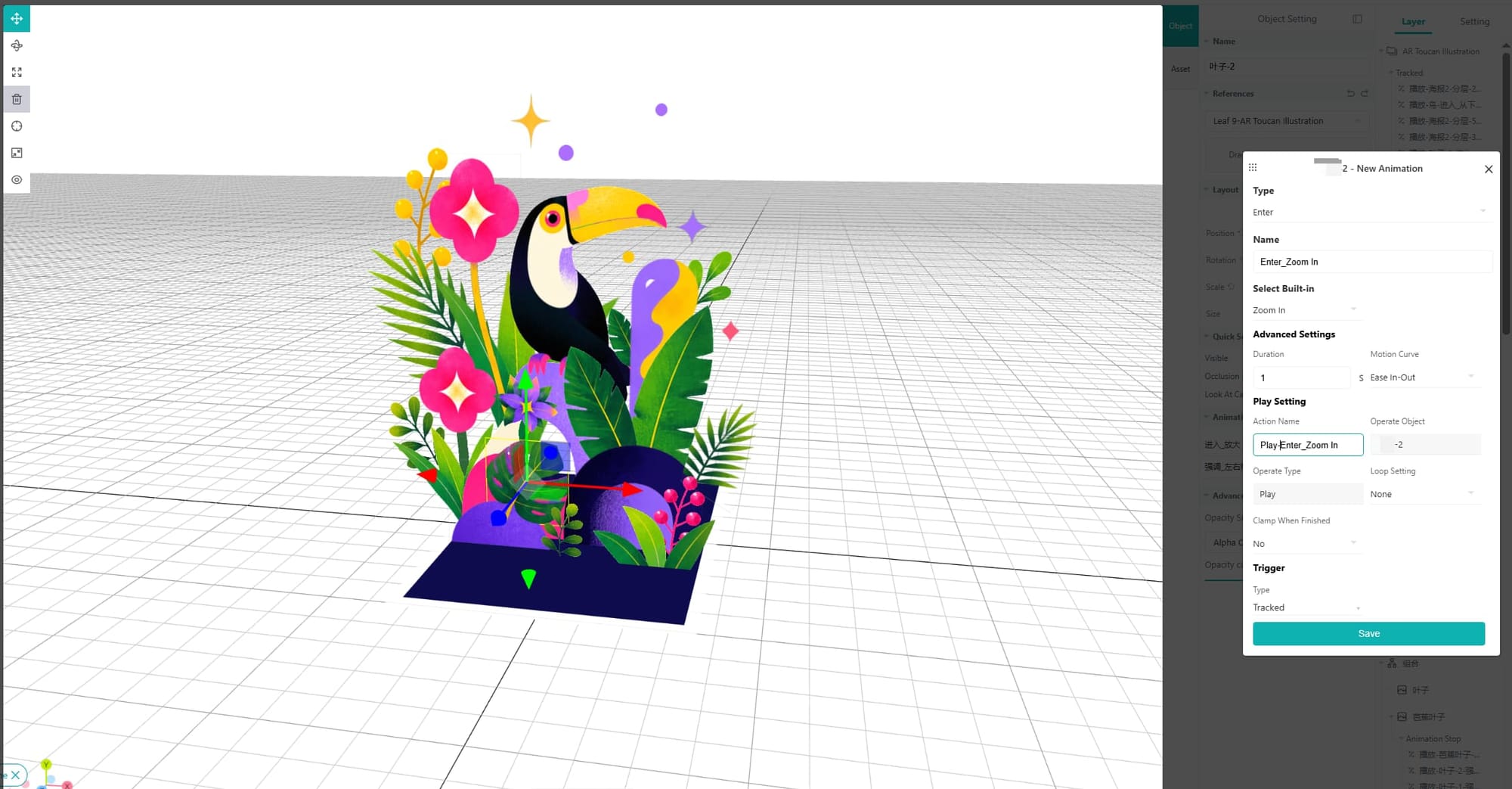
Step 3. Set up the animations and interactions in Kivicube to match your original Adobe Aero project.
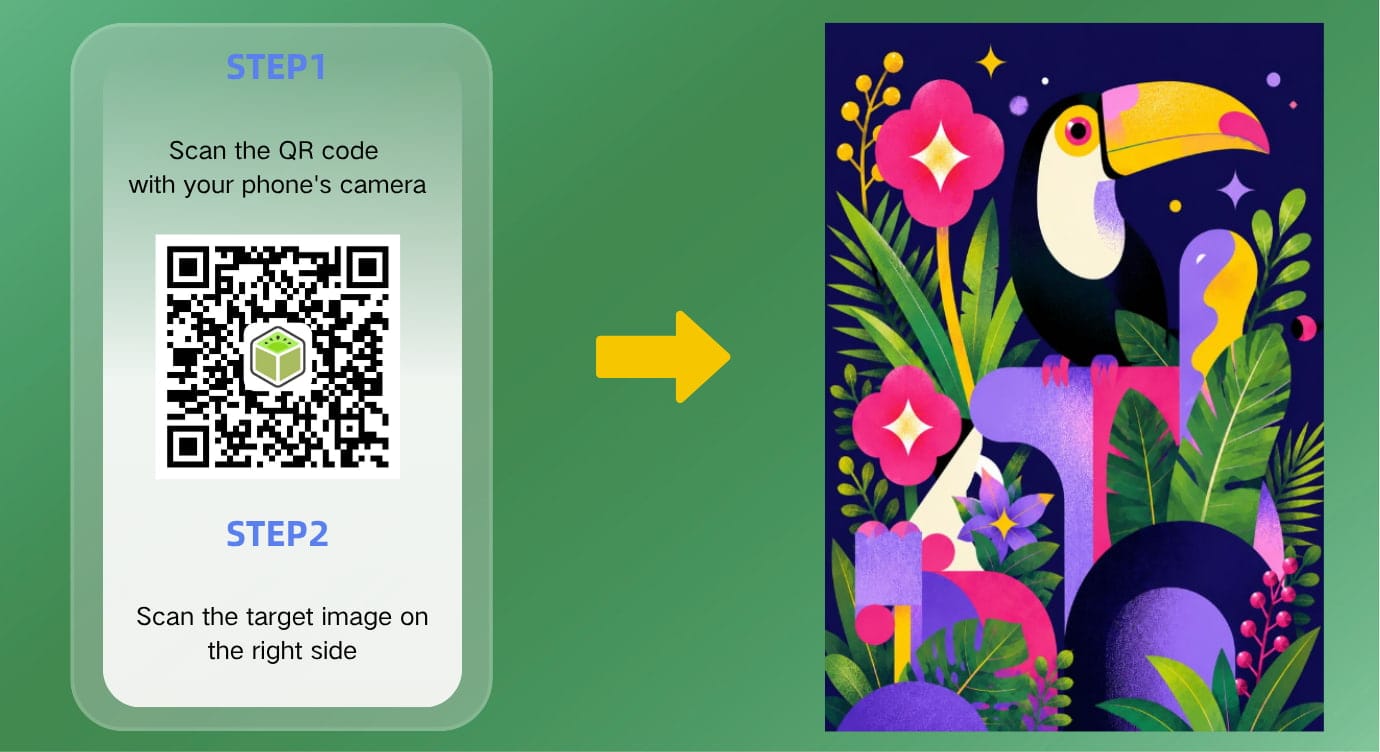
Step 4. Save the AR scene and share the QR code and link across platforms.
FAQs about Adobe Aero Alternatives
Do I Need to Rebuild My Adobe Aero Projects from Scratch?
Not necessarily. You can reuse compatible images, videos, audio files, and 3D models from your existing Adobe Aero projects. However, since .real files cannot be imported directly, you'll need to rebuild the scene structure, animations, and interactions in Kivicube's editor.
Does Kivicube Require Coding to Create AR Experiences?
No. Kivicube provides a drag-and-drop editor, so you can create AR scenes without writing code. Simply upload your own assets or choose from built-in templates, then you can configure animations and interactions directly in the editor.
Can I Publish AR Experiences Without Releasing a Mobile App?
Yes. Kivicube is a WebAR creation platform, so you don't need to develop or distribute a dedicated app. Once your AR experience is published, users can access it through a QR code or link in a mobile browser.
What Types of AR Experiences Can I Create with Kivicube?
Kivicube supports various types of AR experiences, including image tracking, face tracking, world tracking, etc. You can create interactive product displays, AR marketing campaigns, 3D animations, and other browser-based AR experiences for different purposes.
Is Kivicube Free to Use?
Yes. Kivicube offers a free plan that includes two AR scenes. You can access its visual editor and explore different types of AR experiences without an upfront payment.
Conclusion
Although Adobe Aero has been discontinued, AR creation doesn't have to stop there. Whether you want to bring your artwork to life or seek ways to turn static educational materials into engaging AR experiences, Kivicube offers a straightforward way to get started. With its intuitive interface and easy-to-use tools, you can make your own WebAR scenes without coding. Try Kivicube and start building your first WebAR experience.