Visualize Organs & Muscles in 3D with Augmented Reality Anatomy
Want to visualize organs and other human body parts with augmented reality? Follow this tutorial to make augmented reality anatomy 3D experiences easily.
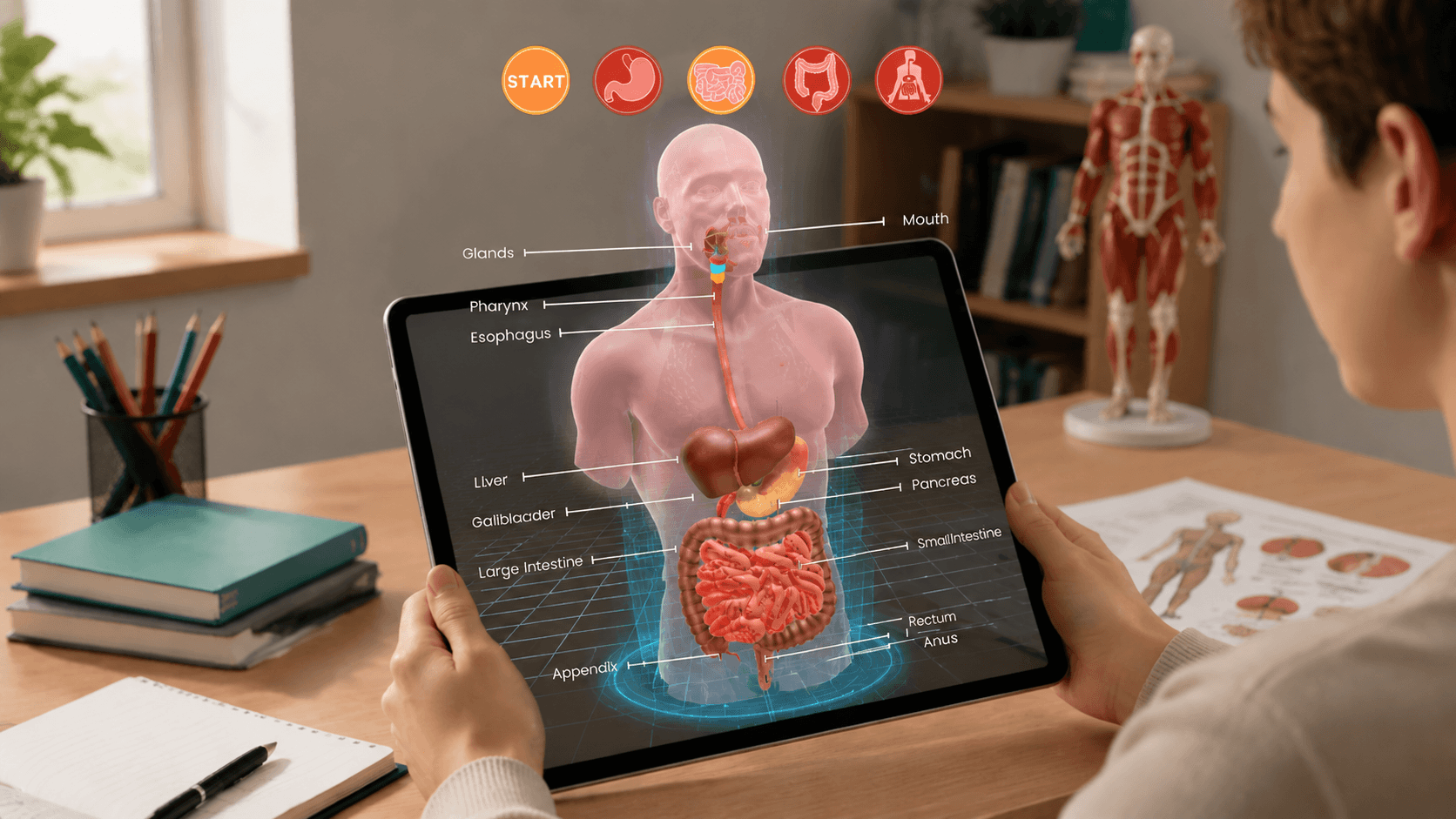
Anatomy is a core subject in medical and biology education. However, textbooks show only flat pictures and students can only receive knowledge passively. Augmented reality anatomy solves this. It projects the human body parts like bones, muscles, organs, and more, in 3D, creating an interactive learning experience and is now widely adopted in modern education. This guide provides a step-by-step tutorial for anyone to create and experience anatomy 3D AR right in your browser.
What Is Augmented Reality Anatomy?
Augmented reality anatomy is the technology that overlays virtual anatomical models of organs, muscles, and bones onto the real world, letting users see and interact with them in 3D. It transforms textbook-based human body studies into interactive 3D learning experiences through simple steps:
- The device camera scans the physical environment.
- The AR tool renders the human body anatomy in 3D onto the table through the screen.
- Users can rotate, zoom, and explore the model from any angle, building a deep understanding through real-time interaction.
AR anatomy is now widely used in medical education and clinical practice. According to research and market reports, the healthcare AR market was valued at USD 4.9 billion in 2025, reflecting strong adoption.
5 Benefits of Augmented Reality Anatomy Education
This kind of interactive, hands-on learning experience brings some real advantages to augmented reality anatomy education.
1. Visualizing Complex Human Body Anatomy in 3D
Traditional textbooks show the human body in flat 2D images, which often fail to convey how organs actually relate and work in space. Augmented reality changes that by letting students see the heart, lungs, liver, and kidneys as full 3D objects that sit inside the body.
2. Increasing Student Engagement and Interaction
AR turns passive learning into active exploration. Instead of just reading about how the digestive system works, students can point their phone at a desk and see the whole digestive process in front of them. Besides, they can tap on each organ to pull up its name and function, and rotate them to view from any angle. Explore more on how augmented reality benefits education.
 Leonie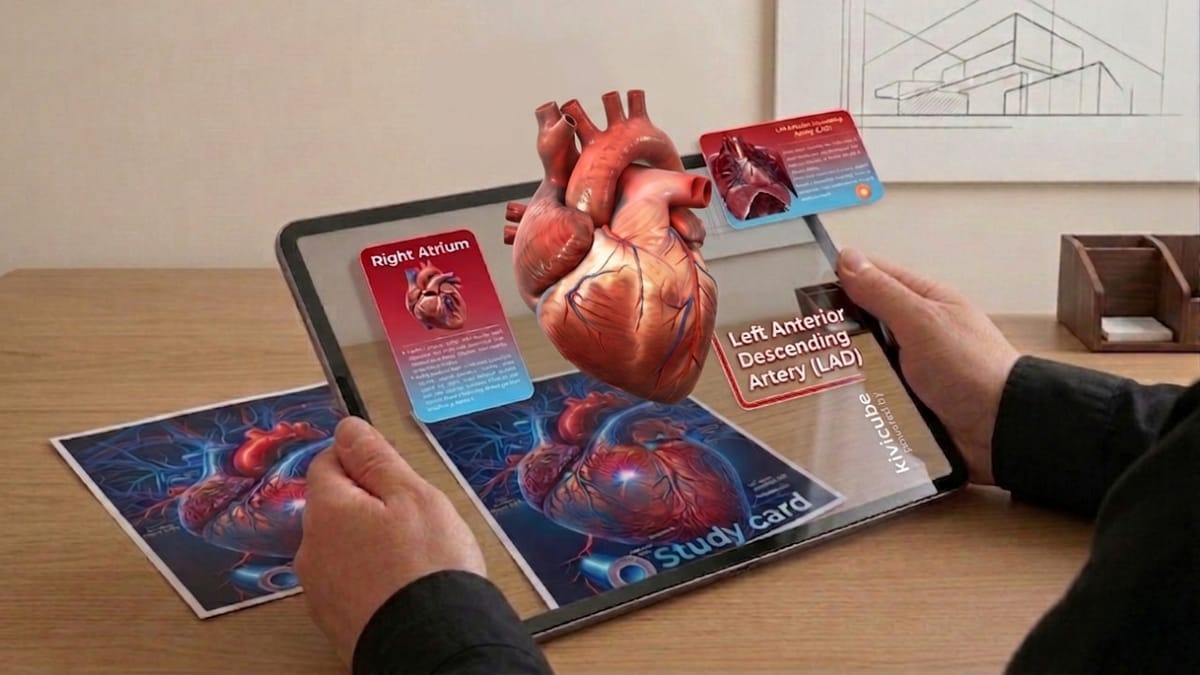
3. Enhancing Knowledge Retention & Understanding
Seeing a structure in 3D helps students remember it far better than looking at a static diagram. AR lets learners revisit any model as many times as they want, and replay the experience whenever they need a refresher. This repeated, self-paced exposure cements the material into long-term memory.
4. Reducing Reliance on Cadaver Dissection & Labs
Cadavers tie anatomy learning to physical lab spaces with fixed hours and limited access. AR removes those barriers. Students can explore a full 3D body on their phone anywhere, anytime, and repeat the experience as often as they need, without stepping into a dissection lab.
5. Cost-Effective for Schools
Implementing AR anatomy does not require expensive lab equipment or specialized storage facilities. WebAR technology even lightens the burden by running everything in the browser. Students can experience it directly on a phone or tablet through the camera without the need for costly headsets.
How to Create Augmented Reality Anatomy with WebAR?
Instead of relying on an augmented reality anatomy app, the best solution to visualize human anatomy structure is WebAR, and Kivicube offers the easiest way to build it. Taking the digestive system as an example, follow the 3 steps below to bring it to life.
Step 1. Log in to Kivicube and duplicate the "AR Anatomy: Digestive System" template.
Step 2. Adjust the scene with images, 3D models, and interactive elements. Or generate assets using the built-in AI generator.
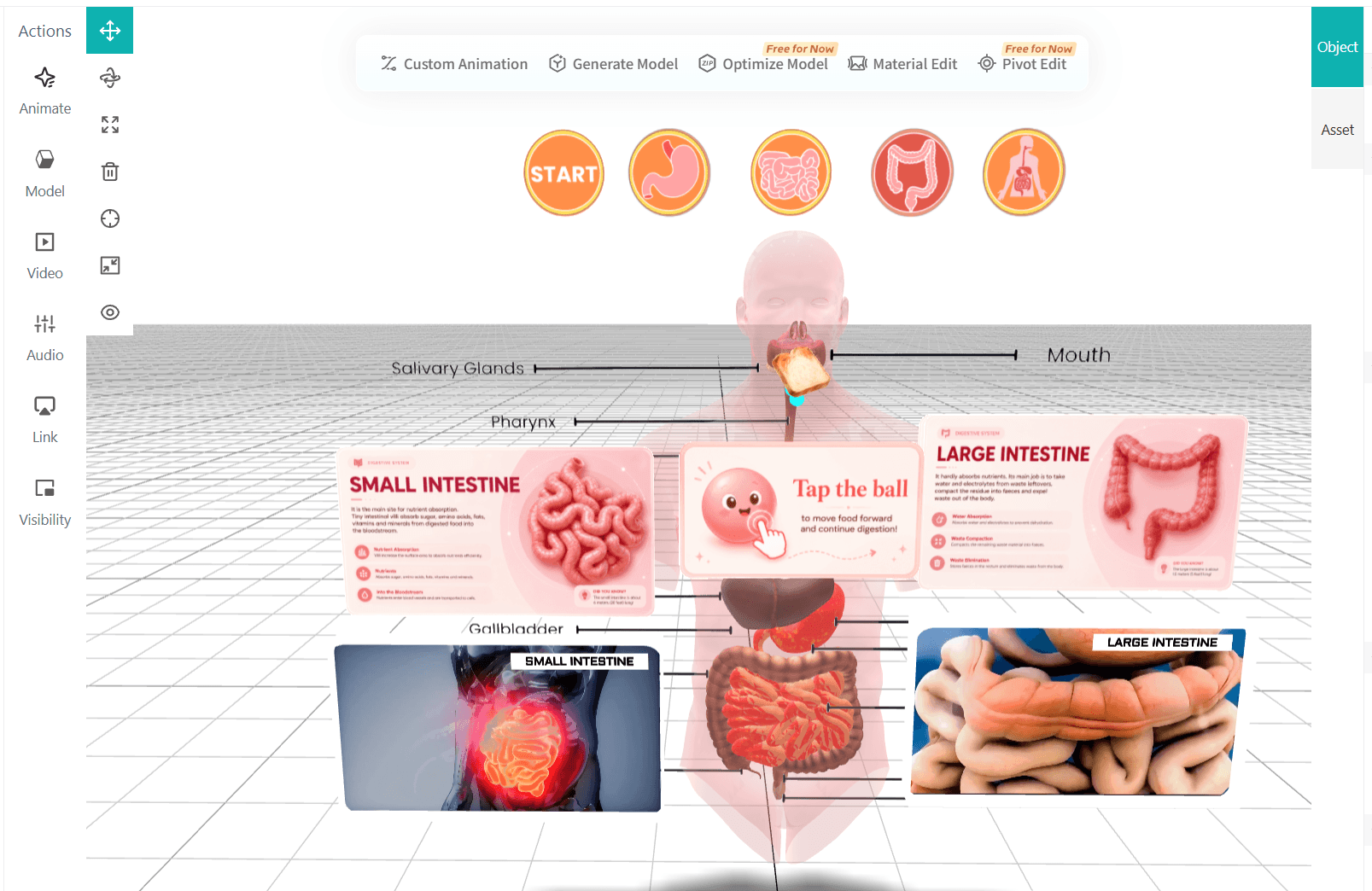
Step 3. Publish and share your creation with a QR code or link.
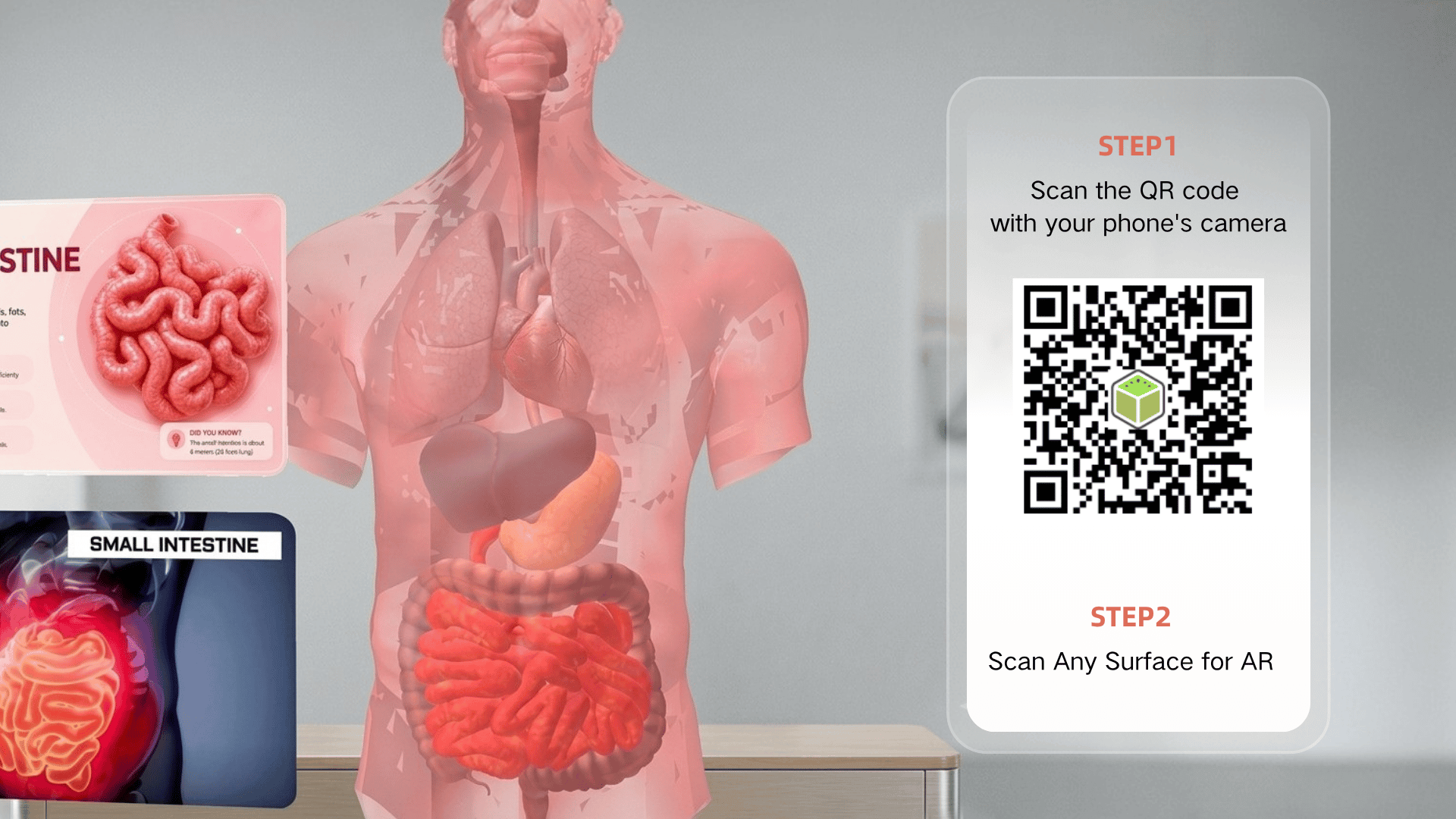
Why Choose Kivicube for Human Anatomy Visualization
That is the basic walkthrough, but Kivicube offers much more than that. It is a professional WebAR tool perfect for augmented reality anatomy education, allowing users to visualize organs, skeleton, bones, and more of the human body in 3D. It can first generate life-size 3D anatomy and further enhance the augmented reality experience by adding interactions, visualized information, and more content through a web-based drag-and-drop editor.
⭐️ Duplicate to Use Anatomy Templates
You do not need to start everything from scratch. Kivicube provides duplicate-to-use anatomy templates. For example, there's a digestive system template that can be duplicated directly and published for educational purposes, saving hours of modeling work.
⭐️ Two Free Projects to Start
Every new user gets two free projects included with their account. You can create and publish two complete AR anatomy scenes without paying anything. No billing info, no credit card.
⭐️ AI-Fueled Body Part Generation
The KiviAI 3D model generator creates 3D anatomical structures from text, images, and even videos. Simply type in "human heart" to get a life-like heart anatomy 3D, or upload an image of a liver to get a 360° 3D model of it in minutes.
⭐️ True-to-Life Realistic Rendering
Kivicube rendering engine delivers models with realistic textures, shadows, and surface details that look exactly like the actual biological specimens. Muscles show natural fiber patterns, and organs display accurate colors. This level of visual fidelity visualizes anatomy like never before.
We also offer customized AR services. Feel free to reach out and discuss your specific needs.
Conclusion
Augmented reality anatomy introduced a new way for human body education. Instead of passively reading texts or watching video explanations, AR brings the 3D models of organs and inner systems to the students' table. With WebAR platforms like Kivicube, creating these experiences no longer requires coding skills or expensive hardware. Teachers can build anatomy 3D in minutes and students can experience it through the phone camera. For any specific needs in the fields of anatomy or medical health, feel free to reach out and customize a service.
FAQs
Do I Need an App to Make Augmented Reality Anatomy?
Not necessarily. A WebAR tool like Kivicube runs everything directly in your browser. Neither educators nor students need to download or install anything to view AR content.
Can I Create Augmented Reality Anatomy for Free?
Yes. Kivicube offers two free projects for new users. You can build, preview, and publish AR anatomy scenes without entering any payment information.
Do I Need Coding Skills to Create AR Anatomy Content?
No. Kivicube provides a visual drag-and-drop editor. Everyone can add models and interactions without writing a single line of code.
Can I Rotate the 3D Model with My Finger?
Yes. Augmented reality projects created with Kivicube allow students to rotate, zoom in and out, and inspect any angle of the model using simple finger touch.
Can I Customize Anatomy AR for My Project?
Yes. For any specific augmented reality needs that feel hard to finish on your own, you are welcome to contact us and discuss the whole design and details. We'll help create the experience fully tailored to your program needs.