English
Appearance
| Type | Specification | Recommendation |
|---|---|---|
| Model Format | Supports GLB, GLTF, FBX, OBJ; textures and models can be packaged as a ZIP | GLB is strongly recommended |
| File Size | Upload size limits: Freen Plan (≤ 30 MB) · Starter Plan (≤ 50 MB) · Pro Plan (≤ 100 MB) · Enterprise Plan (≤ 100 MB) | Recommended ≤ 10 MB; optimal ≤ 5 MB |
| Type | Limit | Recommendation |
|---|---|---|
| Meshes per model | ≤ 10 | ≤ 5 |
| Meshes per scene | ≤ 50 | ≤ 10 |
| Triangles per model | ≤ 50,000 | ≤ 30,000 |
| Triangles per scene | ≤ 200,000 | ≤ 60,000 |
| Mesh naming | Letters, digits, underscores ( _ ), and hyphens ( - ) only. Spaces and special characters are not supported | 1. Do not use Chinese characters 2. Every object in the model must have a unique name |
| Model scale | Must not be zero or negative | Apply scale as 1 |
| Pivot point | Place at the geometric center or base center of the model, then position the model at the world origin | |
| Face direction (normals) | For closed meshes, set the outward-facing side as the front face; for open meshes, set the camera-facing side as the front face | |
| Model proportions | Model at real-world scale | |
| Pre-export cleanup | Reset and apply all transform data, construction history, and modifier stacks | Back up the file before export for easier revision |
| Material setup | For assets with transparent components, use separate meshes and materials for transparent and opaque parts to achieve better rendering results | |
| Topology | 1. No isolated (stray) vertices 2. No coincident (overlapping) vertices 3. No duplicate or co-planar faces 4. Use quad-based modeling; triangles are acceptable only when necessary 5. Avoid poles unless unavoidable 6. Clean, uniform topology with well-structured edge flow | |
| Scene structure | Remove all unused objects from the scene (e.g., empty nodes, hidden objects, helper objects) |
| Requirement | Reason |
|---|---|
| Relax-unwrap all UV islands | Prevents texture distortion and stretching |
| No UV overlaps | Prevents incorrect texture mapping |
| Place UV seams in areas not visible from standard camera angles | Prevents visible seams after texturing |
| UV islands should be as flat and orthogonal as possible, maximizing texel utilization; all islands must remain within the UV 0–1 tile | Maximizes texture space usage and minimizes waste |
| Consistent texel density across all UV islands | Ensures uniform texture clarity across the entire model |
| Type | Limit | Recommendation |
|---|---|---|
| Materials per model | ≤ 10 | ≤ 5 |
| Textures per model | ≤ 10 | ≤ 10 |
| Materials per scene | ≤ 40 | ≤ 5 |
| Textures per scene | ≤ 40 | ≤ 10 |
| Material type | Unlit and PBR (Metallic-Roughness workflow) are supported | |
| Material naming | Letters, digits, underscores, and hyphens only. Spaces and special characters are not supported | Do not use Chinese characters |
| Texture naming | Letters, digits, underscores, and hyphens only. Spaces and special characters are not supported | Do not use Chinese characters. Recommended convention: · XXX_basecolor.jpg· XXX_normal.jpg· XXX_roughness.jpg· XXX_metallic.jpg |
| Texture format | JPG and PNG are supported | |
| Texture resolution | Maximum: 2048 × 2048 px. Dimensions must be powers of two (2, 4, 8, 16, 32, 64, 128, 256, 512, 1024, 2048). When UV wrap mode is set to Repeat for use in Mini-Programs, both width and height must be powers of two. | Compress textures with an image compression tool before export |
| Type | Limit | Recommendation |
|---|---|---|
| Animations per model | ≤ 10 | ≤ 5 |
| Animations per scene | ≤ 40 | ≤ 10 |
| Bones per model | ≤ 100 | ≤ 50 |
| Bones per scene | ≤ 200 | ≤ 100 |
| Morph targets per model | ≤ 50 | ≤ 30 |
| Morph targets per scene | ≤ 100 | ≤ 60 |
| Naming | 1. Bone, morph target, and animation clip names support only letters, digits, underscores, and hyphens. Spaces and special characters are not supported. 2. All animation, morph target, and bone names must be unique | Do not use Chinese characters |
| Animation type | Transform animation, skeletal animation, and morph target animation are supported. Vertex cache animation is not currently supported | |
| Frame rate | Any | 30 FPS |
| Scale | Meshes and bones must not be scaled to zero or negative values during animation | Minimum scale: 0.01 or 0.001 |
| Bone influences | Maximum 4 bone influences per vertex (the upper limit of bones that can influence a single vertex during skinning) | |
| Root bone | 1. Do not name any bone "root"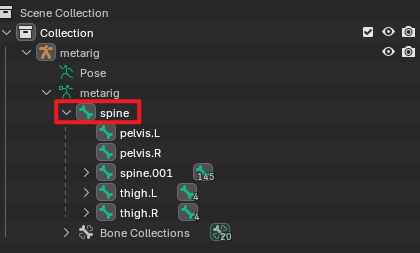 2. The root bone must carry no animation data | If animation data exists on the root bone, add an empty parent bone above it to serve as the new root |
The following glTF extensions are not currently supported. Models using these extensions cannot be imported into the platform:
The following glTF extensions are not currently supported. Models can still be imported into the platform, but the effects provided by these extensions will not take effect: